
Core Apps
Build more. Repeat less.
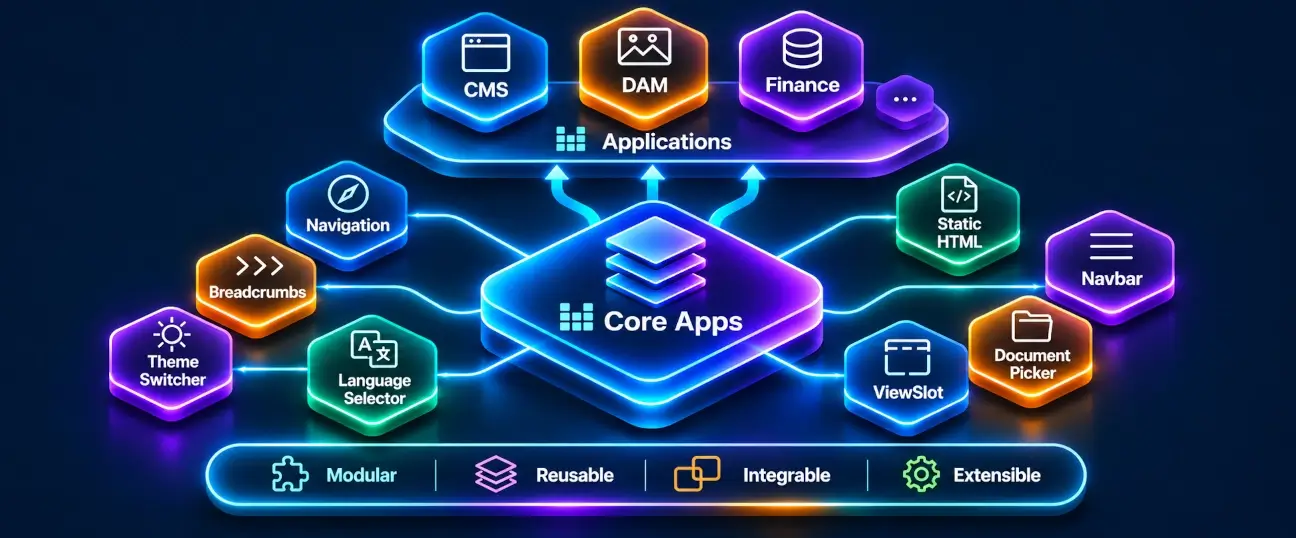
Why rebuild the same functionality for every new application? APPNETOS Core Apps turn recurring application features into reusable, ready-to-integrate building blocks. From authentication and user management to forms, navigation, lists and selectors, common functionality can become part of your own application in a fraction of the time it would take to develop it from scratch.
What is a Core App?
A Core App is a reusable application component provided by the APPNETOS Core. Instead of implementing the same feature repeatedly in separate applications, developers can integrate an existing Core App and adapt it to the requirements of their own project.
Core Apps are built on the APPNETOS App content model: controller-driven components that can bring together application logic, Twig templates, translations and, where needed, JavaScript and CSS. APPNETOS initializes these components and makes their output available to its content and rendering pipeline.
A Core App is not a standalone APPNETOS application. It is a functional building block that an application can use as part of a larger experience.
From an idea to a working feature — faster
Business applications often need the same fundamental capabilities: signing in, managing users and groups, editing records, choosing related documents, navigating between screens and presenting searchable data. Building each of these features again costs development time, testing effort and ongoing maintenance.
APPNETOS changes that equation. With Core Apps, developers can start from established components instead of empty controllers and templates. A complete sign-in experience, including two-factor authentication integration, can be assembled in minutes rather than spending hours rebuilding the underlying feature — depending on the application's requirements and configuration.
The result is more time for the functionality that actually differentiates your business software: its workflows, domain rules, integrations and user experience.
Reuse instead of rebuild
Bring proven building blocks into new applications without repeatedly implementing common functionality.
Adapt instead of compromise
Use the component as a foundation and customize its supported integration points for your application.
Focus on business value
Spend engineering effort on unique business processes rather than recurring application infrastructure.
Bootstrap-ready. Version after version.
Reusable functionality should never force every application to rebuild its interface when the frontend framework evolves. APPNETOS Core Apps address this challenge with versioned Bootstrap CSS templates. Each Core App can provide templates for the Bootstrap versions supported by APPNETOS, keeping its functionality separate from the markup required by a particular framework version.
When support for a new Bootstrap version is introduced, the corresponding templates are added to the Core App itself. Applications using an existing supported version can continue using their established templates, while applications adopting the newer version can use the matching templates. This provides backward compatibility across supported Bootstrap versions and avoids repeating template migration work in every application.
Upgrade the Core App, not every application
New Bootstrap template variants are maintained centrally, allowing supported framework versions to coexist without requiring every consuming application to recreate the component.
Every template is replaceable
Core App templates are not locked in. Developers can replace them to match their application's design, branding and presentation requirements while continuing to reuse the underlying component functionality.
The result is a foundation designed for both stability and freedom: reuse the behavior, choose the Bootstrap version and make the interface your own. Application-specific replacement templates remain the responsibility of the application when its chosen Bootstrap version changes.
81 languages. Ready from day one.
International business software should not require rebuilding the same interface translations for every new application. APPNETOS Core Apps that require translations already provide translations in 81 languages, making multilingual functionality available from the beginning instead of turning localization into a separate development project.
Whether a Core App presents a form, a status message, navigation or another user-facing interaction, its supplied translations help teams bring the same reusable functionality to users across languages. Developers can focus on application-specific terminology, workflows and content rather than repeatedly translating common interface elements.
Multilingual by design
Translation-dependent Core Apps ship with 81 language translations already available for their reusable interface elements.
Less localization work
Avoid translating the same standard interactions separately in every application that integrates a Core App.
Ready to grow internationally
Build on a shared multilingual foundation while retaining control over application-specific wording and content.
Core Apps that do not require translations remain lightweight; the 81-language coverage applies to Core Apps with translatable interface content. Application-specific text and custom replacement templates can still require their own localization work.
One Core. Reusable functionality across applications.
Core Apps are part of the shared APPNETOS foundation. An application selects the components it needs, while APPNETOS coordinates their initialization and rendering through the established content system.
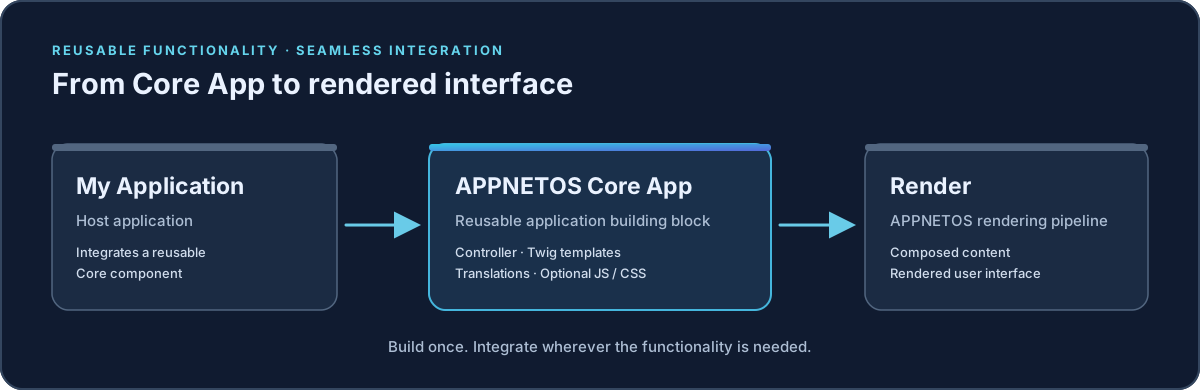
Each component can encapsulate the logic and resources required for its task. This separation helps applications remain focused on their own domain while drawing on reusable functionality maintained within the Core.
Common tasks, already within reach
The potential of Core Apps is best illustrated by the recurring work found in almost every business application:
Authentication and access
Integrate a ready-made sign-in flow, including support for two-factor authentication, rather than designing the entire experience again.
Creation and editing
Use reusable creators, editors and predefined forms for recurring tasks such as managing users, groups and their properties.
Lists and document discovery
Present structured records with reusable list components. Generic document lists can serve different document types, with optional search and pagination.
Pickers and selection
Select existing data through reusable pickers, including a generic document picker with optional search and pagination, or use predefined selectors such as language selection.
Navigation and interface elements
Integrate familiar navigation building blocks and recurring interface functionality without creating every interaction from the ground up.
Your next reusable feature
The Core Apps collection is designed to grow. Additional recurring application needs can become reusable building blocks over time.
This is a conceptual overview, not an exhaustive component catalog. Browse the Core Apps categories for the currently available components and their individual documentation.
Integrated into the APPNETOS rendering architecture
Under the hood, a Core App follows the same App content model as other APPNETOS App components. Its controller coordinates the component's data and templates. Translations, JavaScript and CSS can be provided alongside the component when needed. APPNETOS then integrates the resulting view into the application's rendering process.
Asset delivery follows the active APPNETOS configuration, including the configured caching and optional minification behavior. Developers therefore work with a familiar Core rendering foundation instead of introducing a separate UI framework for each reusable feature.
For the underlying App content contract and rendering behavior, see App Content. Individual Core App pages focus on integration, behavior and the methods or extension points intended for customization.
Designed to evolve with your applications
Core Apps are not a closed collection of fixed screens. They are a growing library of reusable functionality. New components can be added as common requirements emerge, while existing applications can continue to use the building blocks appropriate to their needs.
That is the long-term advantage of a shared Core: improvements to reusable functionality can benefit more than one application, and new projects can begin with a stronger foundation than the projects before them.
One Core. Unlimited Business Software.
Explore Core Apps
Continue with the Core Apps categories to discover the available components. Each category introduces its functional area; each individual Core App page explains what the component does, how to integrate it and which supported methods can be overridden.
The collection will continue to expand without changing the fundamental integration model described here.