
QrCode
Generate self-contained SVG QR codes from arbitrary text through a shared APPNETOS Core utility.
Core\QrCode is a generic renderer, not an authentication service. It can encode URLs,
application resources, plain text, custom URI schemes, and TOTP provisioning URIs without interpreting
their meaning.
Architecture
The mapped runtime class Core\QrCode exposes the implementation in
Core\QrCode\Base. The abstract Base class is marked #[Shared], and
generation
is delegated internally to endroid/qr-code. Resolve the mapped class through the
APPNETOS
Registry; do not instantiate the abstract Base class.
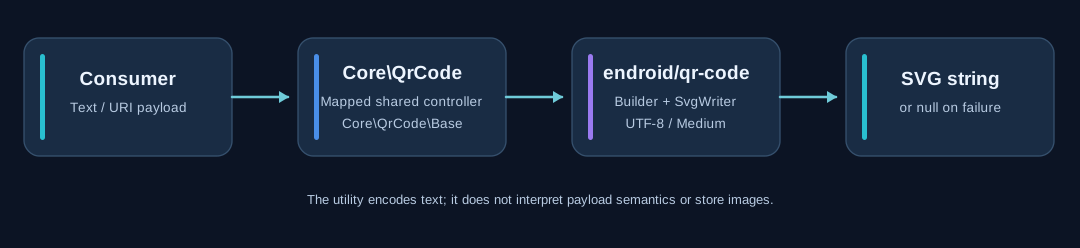
| Layer | Responsibility |
|---|---|
| Application or Core consumer | Creates and validates the payload and decides how to use the resulting SVG. |
Core\QrCode |
Mapped, shared runtime controller used by consumers. |
Core\QrCode\Base |
Trims input, configures generation, returns SVG or null. |
endroid/qr-code |
Encodes the payload and renders SVG via SvgWriter. |
The shared Base is part of the APPNETOS Core layer and is not extendable through the APPNETOS class extension system. Protected defaults can be customized in an appropriate mapped implementation, but that is distinct from extending the shared Base through the extension mechanism.
Quick start
use Core\QrCode;
use Core\Registry;

$qrCode = Registry::get(QrCode::class);

$svg = $qrCode->generate('https://www.appnetos.com');

if ($svg === null) {
    // Handle empty content or a generation failure.
}
The public API deliberately contains only one generation method:
public function generate(string $content): string|nullOn success, it returns a complete SVG document as a string, with the XML declaration omitted. It does not create a file, expose a URL, or return a bitmap image.
Input and output behavior
| Input or condition | Result |
|---|---|
| Non-empty text | SVG string when generation succeeds. |
| Empty string or whitespace-only string | null. |
| Leading or trailing whitespace | Removed using PHP trim() before encoding. |
Library error or other thrown Throwable |
null; the exception is caught internally. |
Important: If whitespace at the start or end of a payload is meaningful, this implementation does not preserve it. Callers must also ensure that the text fits within practical QR-code capacity; the component does not expose a separate capacity-checking API.
Rendering configuration
The current shared defaults are configured in Core\QrCode\Base:
| Setting | Current value | Behavior |
|---|---|---|
| Size | 300 |
getSize() enforces a minimum of 100. |
| Margin | 10 |
getMargin() prevents negative values. |
| Encoding | UTF-8 |
Configured internally with new Encoding('UTF-8'). |
| Error correction | ErrorCorrectionLevel::Medium |
Fixed internal default. |
| Block rounding | RoundBlockSizeMode::Margin |
Margin-based block-size rounding. |
| Writer | SvgWriter |
XML declaration excluded. |
| Result validation | false |
The Endroid builder's validateResult option is disabled. |
Protected customization hooks
protected int $size = 300;
protected int $margin = 10;

protected function getSize(): int
{
    return max(100, $this->size);
}

protected function getMargin(): int
{
    return max(0, $this->margin);
}
An appropriate mapped implementation may adjust these protected properties or getters. The public
generate()
signature does not change. Encoding, error correction, writer, and rounding mode are currently
internal
implementation choices, not public configuration options.
Embedding the SVG in Twig
A controller can generate an SVG string and pass it to a view:
$qrCode = Registry::get(Core\QrCode::class);
$data['qr_code'] = $qrCode->generate($content);
In a Twig template, render only the SVG produced by the trusted Core generator:
Security: Twig's raw bypasses escaping. Never apply it to arbitrary
user-supplied HTML or SVG. The payload is text encoded into a QR code; the generated SVG markup
should
come from the trusted generator.
Common use cases
Public URL
$svg = $qrCode->generate('https://www.appnetos.com');Application resource
$svg = $qrCode->generate(
    'https://example.com/document/' . $documentId,
);
Custom URI scheme
$svg = $qrCode->generate(
    'appnetos://resource/' . $resourceId,
);
Plain text
$svg = $qrCode->generate(
    'One Core. Unlimited Business Software.',
);
These examples illustrate accepted text formats. The generator does not validate the destination, resolve application routes, or interpret custom protocols.
TOTP provisioning integration
The TOTP provider is a consumer of this generic utility. It creates an otpauth://
provisioning URI, then passes that URI to Core\QrCode for SVG generation. The QR code
component does not create TOTP secrets, authenticate users, or manage two-factor enrollment.
TOTP provider
    → create provisioning URI
    → Core\QrCode::generate($uri)
    → SVG for enrollment view
Provisioning URIs can contain sensitive secrets. Protect the enrollment page, avoid logging the URI or generated SVG, and do not cache or publicly expose provisioning QR codes without appropriate safeguards.
For authentication details, see Two-Factor Authentication and TOTP & Email Providers.
Error handling and limitations
The generator catches Throwable and returns null on failure. This shields
callers from dependency-specific exceptions, but it also means the method does not report the
failure
reason.
$svg = $qrCode->generate($content);

if ($svg === null) {
    // Decide how the application should respond.
    // Do not assume that null only means empty input.
}
Currently the utility does not provide PNG output, file export, a data-URI helper, embedded logos, configurable colors, or payload-specific validation. These are possible future enhancements rather than implemented features.
Responsibilities and design principle
Core\QrCode owns text-to-SVG rendering and isolates the third-party library. Consumers
own
URL construction, access control, business rules, payload meaning, persistence, and any QR-code
delivery
mechanism.
This separation keeps QR-code generation reusable across APPNETOS applications, APIs, commands, and Core components without coupling the utility to authentication.