
User & Authentication
Optional, context-isolated users, groups and authentication services.
Optional Identity Services
APPNETOS separates the always-loaded shared core from application-specific identity storage. User and
group services are optional: an application can run without users, groups or permissions. The appnetos-docs
application is an example of a runtime that does not map either collection.
Context & Collection Mapping
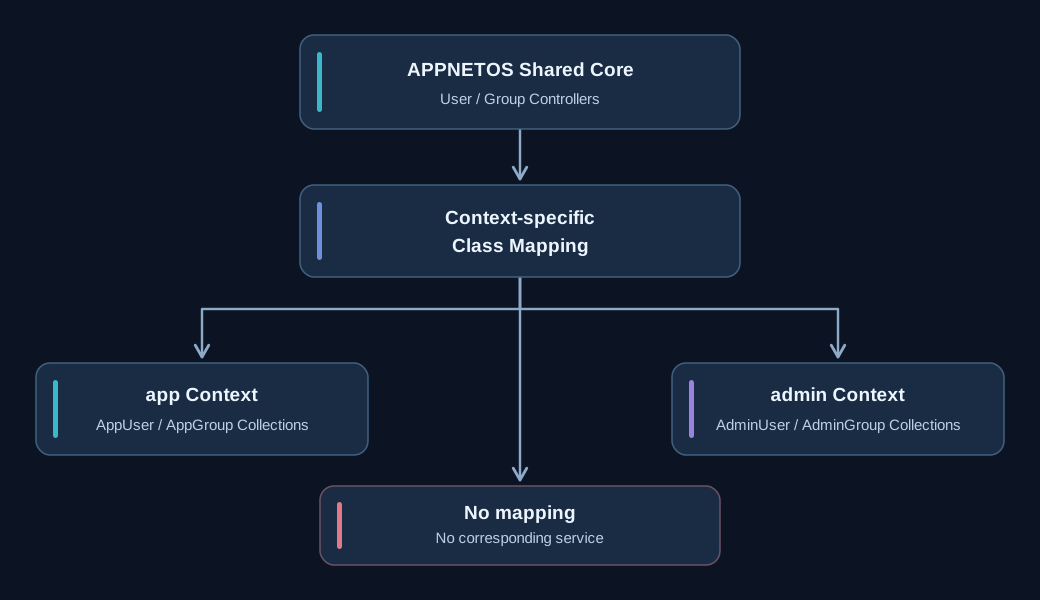
| Context / mapping | Users | Groups |
|---|---|---|
app |
AppUserCollection | AppGroupCollection |
admin |
AdminUserCollection | AdminGroupCollection |
| No user collection | Unavailable | No users or groups |
| User collection only | Available | No group-based permissions |
Concrete documents inherit shared base properties and declare their persistence collection with
#[Database(collection:
                        ...)]
. Class mapping resolves context-specific implementations. Admin collections are not
accessible through the app context by default.
Identity Components
The user controller exposes the current user document; the group controller evaluates permissions; authentication manages credentials, 2FA and trusted devices. Core session storage is documented separately from authentication session state.
Standard Authentication Flow
The reusable CoreApp\Security\ForceSignIn app delegates credential and second-factor
checks
to Core\User\Auth. A successful login redirects, so the next request restores the
authenticated user and loads active groups.
Implementation Details
The following technical reference expands the existing guide with authentication lifecycle, state management, and provider behavior.
APPNETOS User Core
Overview
The APPNETOS User Core provides the shared runtime user, group, permission and authentication infrastructure used by APPNETOS applications and contexts.
The system is intentionally split into small reusable Core controllers. Application- and context-specific behavior is supplied through APPNETOS class mapping, while the shared Core owns the generic workflow.
The User Core covers:
- Runtime user state
- User collection integration
- Group and permission handling
- Password authentication
- Authentication sessions
- Two-factor authentication
- TOTP authentication and enrollment
- Email two-factor authentication
- Recovery codes
- Trusted devices
- Authentication lifecycle hooks
- Force Sign In integration
Architecture
Core\User
├── Base
├── Group
│   └── Base
└── Auth
    ├── Base
    ├── Password
    │   └── Base
    ├── Session
    │   └── Base
    ├── TrustedDevice
    │   └── Base
    └── TwoFactor
        ├── Base
        └── Provider
            ├── Base
            ├── Totp
            │   └── Base
            └── Email
                └── Base
The UI integration for protected application areas is provided by the reusable Core App:
CoreApp\Security\ForceSignIn
Design Principle
Shared Core
→ owns reusable behavior

Mapped child
→ supplies application/context-specific dependencies

Application
→ configures and uses the shared implementation
Applications without user management can leave the corresponding mapped collections unavailable. The User Core is designed to remain optional.
Documentation Structure
User
Authentication
- Authentication Overview
- Authentication Flow
- Password Authentication
- Authentication Session
- Lifecycle Hooks
- Class Mapping
Two-Factor Authentication
- Two-Factor Authentication Overview
- TOTP
- TOTP Enrollment
- Email Two-Factor Authentication
- Recovery Codes
- Trusted Devices
Core Apps
Authentication Overview
Purpose
Core\User\Auth\Base is the central APPNETOS authentication workflow controller.
It coordinates specialized controllers instead of implementing authentication mechanisms directly.
Architecture
Core\User\Auth
├── Password
├── Session
├── TwoFactor
└── TrustedDevice
Responsibility split:
Auth
→ orchestrates authentication

Password
→ hashing and password verification

Session
→ authentication session state

TwoFactor
→ provider coordination

TrustedDevice
→ persistent trusted-browser/device handling
Authentication Flow
The authentication controller coordinates:
- User lookup
- Password verification
- Failed-login tracking
- Successful-login tracking
- Two-factor requirement detection
- Trusted-device validation
- TOTP authentication
- TOTP enrollment
- Email authentication challenges
- Recovery-code verification
- Runtime user assignment
- Logout
- Authentication lifecycle hooks
Optional Infrastructure
Authentication depends on the user collection mapped for the current runtime context.
If no user collection is available, users cannot be resolved and authentication is effectively unavailable.
Trusted devices are optional and independent from two-factor authentication itself.
User collection
→ basic authentication capability

Two-factor provider configured on user
→ interactive 2FA capability

TwoFactorDevice collection
→ trusted-device capability
A missing trusted-device collection must never disable TOTP or email two-factor authentication.
Complete Authentication
A successful password check is not always a complete authentication.
When 2FA is required:
password verified
→ authentication session pending
→ runtime user not authenticated
Only after successful second-factor verification:
2FA successful
→ authentication session complete
→ runtime user assigned