
Process Bootstrap
The protected command-line entry point for APPNETOS commands and background workers. It validates the invocation, creates immutable process input, and starts the same central system bootstrap used by the APPNETOS runtime.
The Process Bootstrap does not provide a separate application architecture. It selects a process context
(cmd or worker) so that the subsequent bootstrap stages can load and
initialize the components appropriate for that context.
Execution Flow
The process entry point runs before regular autoloading, the Core Registry, or application services are
available. Valid requests enter the central SystemBootstrap; help requests and invalid
invocations are handled earlier.
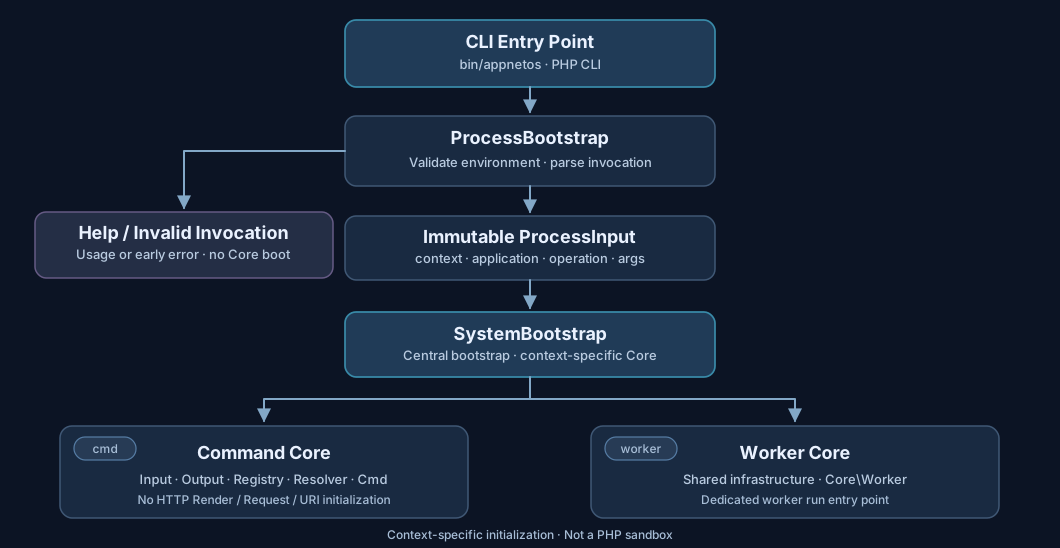
- Validate the environment. Require the PHP CLI SAPI and a defined, non-empty
APPNETOS_ROOT. - Handle help or parse the invocation. Top-level
help,--help, and-hreturn usage information without starting the central system. - Create
ProcessInput. Normalize the entry arguments, identifycmdorworker, and preserve the operation and remaining arguments. - Boot the system. Load
SystemBootstrapdirectly if needed and callSystemBootstrap::boot($processInput). - Resolve the result. For
cmd, read the exit code fromCore\Cmd; for a normally returningworkerbootstrap, return success.
Once the central bootstrap begins, the established Bootstrap Sequence applies. Process startup is not a replacement for that sequence.
CLI Invocation
The first positional argument selects the process context. Core commands use the appnetos:
prefix and do not require an application identifier; application commands and workers do.
| Invocation | Purpose |
|---|---|
php bin/appnetos cmd <appnetos-command> [arguments...] |
APPNETOS Core command |
php bin/appnetos cmd <application> <operation> [arguments...] |
Application command |
php bin/appnetos worker <application> scheduler [watch] |
Application scheduler |
php bin/appnetos worker <application> runner [queue] |
Application queue runner |
php bin/appnetos cmd appnetos:diagnose
php bin/appnetos cmd appnetos:cmd:list --all
php bin/appnetos cmd appnetos-dns-control dns:configuration:validate
php bin/appnetos worker appnetos-dns-control scheduler watch
php bin/appnetos worker appnetos-dns-control runner dns
The Process Bootstrap validates the syntax of the application
identifier (lowercase letters, numbers, and single hyphens). It does not
establish that an application exists, is active, or supports the requested operation. Those checks
belong to later bootstrap and runtime stages.
Immutable Process Input
Bootstrap\Process\ProcessInput is a final readonly value object. Its values are
established before the central bootstrap and cannot be changed afterwards.
| Field | Meaning |
|---|---|
executable |
Process entry script |
context |
cmd or worker |
application |
Application identifier, or null for Core commands |
operation |
Requested command or worker operation |
arguments |
Remaining positional arguments and options, with normalized numeric indexes |
It contains syntactically resolved startup information only. Application activation, context
availability, command discovery, worker configuration, and other mutable runtime state are not validated
by ProcessInput.
Context Isolation and Security
APPNETOS initializes the Core components selected for the active runtime context, rather than
starting a complete HTTP application for every process. The process-specific Core bootstrap
files define their own classes and init lists. Context-aware autoload and
class resolution complement this separation.
This is a deliberate security and architecture boundary: CLI and worker processes avoid unnecessary HTTP-related initialization, reducing their normal dependency surface and the risk of accidentally using functionality intended for another context.
| Core component group | cmd |
worker |
HTTP app (comparison) |
|---|---|---|---|
| Config, Debug, Log, Shutdown | Initialized | Initialized | Initialized |
| Redis, Database, Cache, Files | Initialized | Initialized | Initialized |
| HTTP Request / Response | Not bootstrapped | Not bootstrapped | Initialized |
| Session / Cookie | Not bootstrapped | Not bootstrapped | Initialized |
| Render / JS / CSS | Not bootstrapped | Not bootstrapped | Initialized |
| URI routing | Not bootstrapped | Not bootstrapped | Initialized |
| Command Input, Output, Registry, Resolver | Initialized | Not bootstrapped | Not bootstrapped |
| Worker runtime | Not bootstrapped | Initialized and run | Not bootstrapped |
Example: no rendering in cmd. The appnetos/cmd/bootstrap.php
configuration does not list Core\Render, Core\Js, Core\Css, or
Core\Uri for initialization. Commands use their own input/output and command execution
infrastructure instead of the HTTP rendering pipeline.
Security scope
Context isolation describes the standard configured autoload, class selection, and bootstrap behavior. It is not a PHP sandbox or an operating-system security boundary. Explicit imports, custom mappings, extensions, and configuration changes still require careful review. Do not assume that a class is impossible to load solely because it is absent from a Core bootstrap list.
For the general architecture, see Application Contexts and Application Isolation.
Context-specific Core Bootstrap
The process contexts use separate Core bootstrap configurations. The configured classes
entries are resolved through the Registry, and init entries are initialized in order by the
Core bootstrap.
Command context
appnetos/cmd/bootstrap.php
Prepares shared infrastructure plus the command input/output, discovery, generator,
command registry, resolver, and Core\Cmd components. The process entry
bootstrap later retrieves Core\Cmd::getExitCode().
Worker context
appnetos/worker/bootstrap.php
Prepares shared infrastructure and Core\Worker. Its Core bootstrap
configuration additionally declares 'run' => Worker::class, making the
worker the execution entry point.
The two contexts intentionally do not initialize the same runtime. Command discovery and worker scheduling or queue processing are distinct responsibilities. Detailed command and worker APIs belong in their respective Core references.
Errors and Exit Codes
Failures detected before the central system is ready are handled by the protected Process Bootstrap and
written to STDERR. Help and usage information are written to STDOUT.
| Code | Meaning |
|---|---|
0 |
Help or successful completion; a normally returning worker bootstrap also returns success |
1 |
Bootstrap/runtime failure, including failure to resolve the command exit code |
2 |
Invalid invocation detected through ProcessException |
For commands, the final successful bootstrap result is not automatically zero: ProcessBootstrap
retrieves the exit code maintained by Core\Cmd. For workers, this method returns zero when
the system bootstrap returns normally; a worker that exits or terminates internally may have its own
process lifecycle.
ProcessBootstrap, ProcessInput, and ProcessException are protected
bootstrap components and are not extension points for APPNETOS Class Extension. Regular runtime
customization starts after the protected bootstrap has established the appropriate infrastructure.
Best Practices
- Use
cmdfor command-line operations andworkerfor scheduler and runner processes. - Keep HTTP rendering, routing, and response behavior out of command and worker implementations unless a deliberate, reviewed customization requires it.
- Preserve context-specific autoload and Core bootstrap configurations; avoid unnecessarily broadening a process context.
- Use the existing Core command and worker infrastructure rather than creating another process entry bootstrap.
- Handle operational failures with meaningful command exit codes and suitable logging.