
CORS Bootstrap
The fifth bootstrap step optionally grants trusted browser origins access to a resolved application context, handles CORS preflight requests, and defines frame-embedding policy before session and security initialization.
Purpose and Execution
Bootstrap\Cors\CorsBootstrap executes after Application
Bootstrap and before Session
Bootstrap. Application Bootstrap has already resolved the application and its exact runtime
context. CORS does not define, replace, or discover routes.
Applications normally work without any CORS configuration. Their existing routes handle same-origin browser requests. A CORS configuration is only needed when another browser origin must be allowed to access a specific context, or when the context should permit embedding by trusted origins.
public function boot(): void
{
    if ($this->runtimeState->getProcess()) {
        return;
    }

    $application = $this->runtimeState->getApplication();
    $context = $this->runtimeState->getContext();

    if ($application === null || $application === '' || $context === null || $context === '') {
        return;
    }

    $configuration = $this->loadCorsFile($application);
    $definition = $configuration['contexts'][$context] ?? null;

    // Only explicitly active contexts proceed to origin validation and header handling.
}
The excerpt illustrates the early guards and exact-context lookup. Process runtimes, missing application or context resolution, missing files, and missing or inactive context definitions do not enable CORS. The bootstrap does not fall back to the default context or base context.
Request Flow
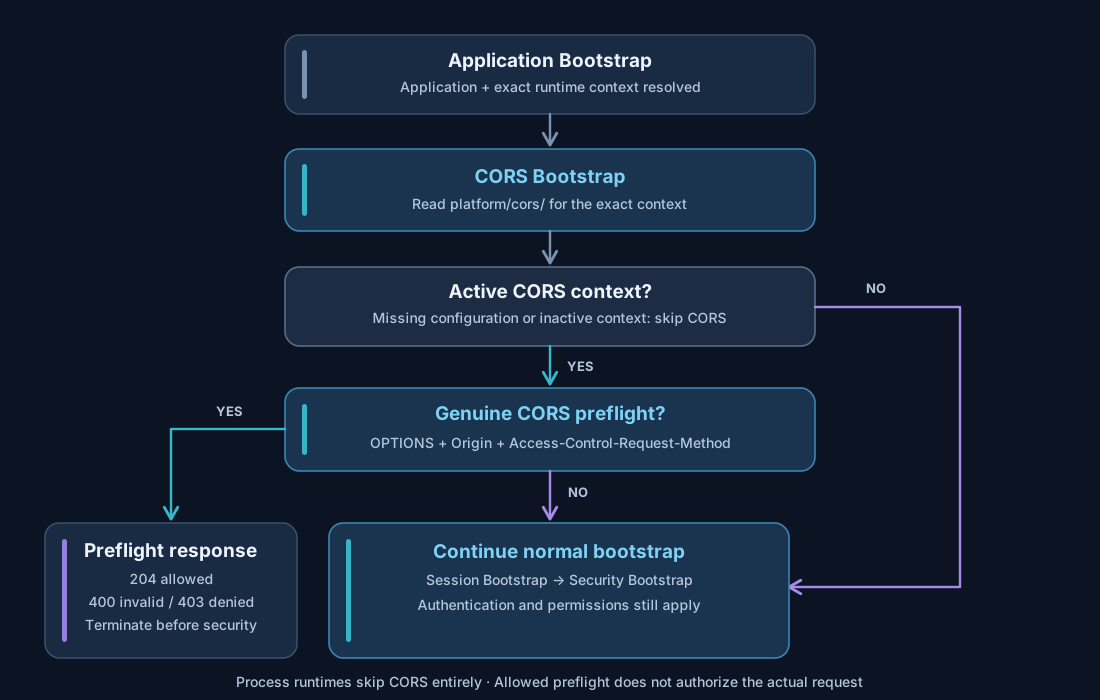
The diagram distinguishes genuine browser preflight requests from ordinary HTTP requests. Only genuine preflights are terminated inside this bootstrap step.
Configuration File Resolution
Installed runtime CORS configurations are read from platform/cors/ using the resolved
application identifier. They are optional.
platform/cors/appnetos-dns-control.php
platform/cors/appnetos-dns-control.docker.php
If APPNETOS_ENVIRONMENT is docker and the second file exists, it replaces
the complete default configuration. There is no array merge or key-level fallback. If the
environment file does not exist, the default file is used; if neither exists, no CORS permissions are
enabled.
Every required application and context setting must be present in the selected configuration file. Do not expect missing keys to be inherited from the default file.
Complete Configuration Example
On appnetos.com, API Dev runs on separate hosts and needs browser access to the DNS Control
admin-rest context. This example allows those browser origins without weakening REST
authentication.
<?php

declare(strict_types=1);

return [
    'application' => 'appnetos-dns-control',
    'contexts' => [
        'admin-rest' => [
            'active' => true,
            'origins' => [
                'api-dev.appnetos.com',
                'api-dev.appnetos.de',
            ],
        ],
    ],
];
The scheme-free origin definitions above expand to both http:// and https://
variants. For production deployments where only HTTPS is intended, use explicit HTTPS origins instead.
| Key | Type | Rule |
|---|---|---|
application |
string |
Required; must equal the resolved application identifier and configuration filename stem. |
contexts |
array |
Required; maps exact runtime context names to their CORS definitions. |
contexts.<context>.active |
bool |
Optional; defaults to false. Only true activates a context. |
contexts.<context>.origins |
array |
Required for an active context; lists trusted browser origins. |
Application Identifier
The application key identifies the application whose browser access rules are being
configured. It must match the application selected by Application Bootstrap and the CORS configuration
filename (excluding the environment suffix).
'application' => 'appnetos-dns-control',A missing or mismatched application identifier causes bootstrap validation to fail when the configuration file is loaded.
Context-Specific Activation
Each context is configured independently. A rule for admin-rest does not automatically apply
to admin, rest, or app. Contexts omitted from the file are not
enabled.
'contexts' => [
    'admin-rest' => [
        'active' => true,
        'origins' => [
            'https://api-dev.appnetos.com',
        ],
    ],
    'admin' => [
        'active' => false,
    ],
],
When active is omitted, its effective value is false. An active context must
provide an origins array; even an empty array is valid but grants no cross-origin access.
It still establishes a frame-ancestors 'self' policy for that active context.
'contexts' => [
    'app' => [
        'active' => true,
        'origins' => [], // No cross-origin access; same-origin framing only.
    ],
],
Origin Definitions and Normalization
An origin consists of a scheme, host, and optional port. The bootstrap accepts explicit
http:// or https:// origins and scheme-free host definitions. Scheme-free
definitions expand to both protocols; an explicit non-default port is preserved.
'origins' => [
    'api-dev.appnetos.com',          // HTTP and HTTPS
    'https://api-dev.appnetos.de',  // HTTPS only
    'http://localhost:20000',       // Local development origin
    'localhost:20001',              // HTTP and HTTPS, port 20001
],| Definition | Effective origin(s) |
|---|---|
api-dev.appnetos.com |
http://api-dev.appnetos.com and https://api-dev.appnetos.com |
https://api-dev.appnetos.com |
HTTPS only |
localhost:20001 |
http://localhost:20001 and https://localhost:20001 |
https://localhost:443 |
Normalized to https://localhost |
Normalization lowercases schemes and hosts, removes default ports (80 for HTTP and
443 for HTTPS), and eliminates equivalent duplicates.
Do not include URL
paths, trailing slashes, queries, fragments, credentials, wildcard hosts, null origins, or
whitespace/control characters. Invalid configured origins cause an exception for an active context.
'origins' => [
    'https://api-dev.appnetos.com',   // Valid
    // 'https://api-dev.appnetos.com/', // Invalid: trailing slash / path
    // 'https://*.appnetos.com',       // Invalid: wildcard
    // 'https://user@api-dev.appnetos.com', // Invalid: credentials
],
Preflight Requests and Responses
A request is recognized as a CORS preflight only when its HTTP method is OPTIONS and both
Origin and Access-Control-Request-Method are present. An ordinary OPTIONS
request is not intercepted and proceeds to the remaining bootstrap steps.
OPTIONS /rest/... HTTP/1.1
Host: dns.appnetos.com
Origin: https://api-dev.appnetos.com
Access-Control-Request-Method: POST
Access-Control-Request-Headers: Authorization, Content-Type
For a valid preflight from an allowed origin, the bootstrap responds immediately, before session or authentication handling:
HTTP/1.1 204 No Content
Access-Control-Allow-Origin: https://api-dev.appnetos.com
Access-Control-Allow-Credentials: true
Access-Control-Allow-Methods: POST
Access-Control-Allow-Headers: Authorization, Content-Type
Access-Control-Max-Age: 600| Preflight condition | Status | Behavior |
|---|---|---|
| Allowed origin, valid method and headers | 204 |
Preflight accepted; request processing ends early. |
| Origin not allowlisted or malformed | 403 |
Preflight rejected. |
| Invalid method token, forbidden method, or invalid requested header names | 400 |
Preflight rejected. |
| Ordinary OPTIONS without required preflight metadata | Not handled here | Normal bootstrap continues. |
The forbidden preflight methods are CONNECT, TRACE, and TRACK.
Otherwise, the bootstrap accepts syntactically valid requested method and header tokens; it does not
consult application route definitions to establish whether that method is implemented.
The browser may send the subsequent request, but the actual request must still pass Session Bootstrap, Security Bootstrap, route handling, authentication, and application permissions. An allowed origin does not grant access to a protected endpoint.
Response Headers and Credentials
For an active context, an allowlisted browser Origin receives its original origin value in
Access-Control-Allow-Origin and Access-Control-Allow-Credentials: true. An
unlisted origin receives no allow-origin permission on ordinary responses. The bootstrap appends Vary:
Origin to preserve origin-dependent cache behavior.
The bootstrap exposes PHP response headers through Access-Control-Expose-Headers, excluding
Set-Cookie and Set-Cookie2. It installs a PHP header callback so the CORS and
frame headers are finalized again just before PHP sends the response, including headers added by later
layers.
Credentials support does not override browser cookie policies, SameSite restrictions, or authentication requirements. A configured origin must be trusted.
Frame Embedding and Content Security Policy
For active contexts, the same allowlist also defines permitted frame ancestors. The bootstrap adds 'self'
and every normalized configured origin to the CSP frame-ancestors directive, even when a
navigation request has no Origin header.
Content-Security-Policy: frame-ancestors 'self' http://api-dev.appnetos.com https://api-dev.appnetos.comExisting PHP-managed CSP directives other than frame-ancestors are retained. Existing PHP
frame-ancestors directives are replaced, and PHP X-Frame-Options headers are
removed. Separately added web-server or reverse-proxy policies remain outside this bootstrap's control
and must not introduce conflicting restrictions.
Enable CORS for the HTML context intended for embedding. Enabling CORS only for admin-rest
does not grant frame embedding permissions to a different admin or app
context.
Validation and Runtime Boundaries
A selected configuration file must return an array, contain an application identifier
matching the resolved application, and contain a contexts array. The selected context
definition must be an array, and its active value, if present, must be boolean. Only an
active context requires valid origins.
Invalid configuration structures throw an exception during bootstrap. CORS does not change the resolved application, its route definitions, its runtime context, or its security identity. Process executions skip CORS entirely.
Application Customization and Update Safety
Do not place custom configuration files or modifications inside the
original application directory, and never edit its supplied templates under <application>/.files/.
Such changes may be lost when the application is updated, replaced, or reinstalled. Maintain
application-specific customizations under ./custom/ using the APPNETOS customization
mechanism. See Application Customization and Custom Installation for the installation and CMD
workflow.
At runtime, CorsBootstrap reads the installed configuration from platform/cors/,
not directly from the application's original .files directory or the customization source
tree.