
Database
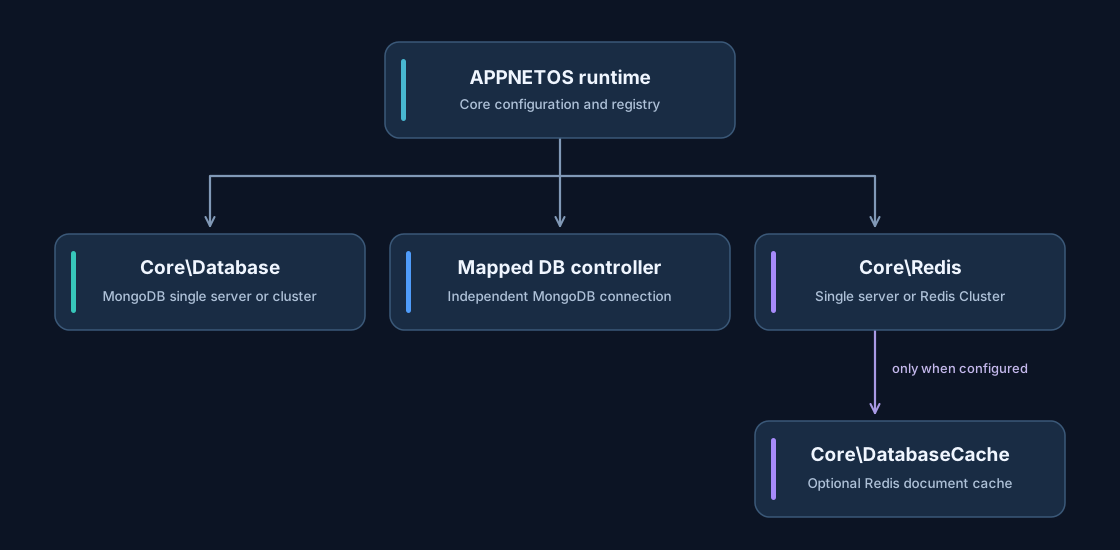
APPNETOS Core infrastructure component: Database.
Core\Database establishes MongoDB connections, checks server availability with an administrative
ping and exposes the MongoDB database API. It supports standalone MongoDB deployments and clustered
topologies through URI and driver configuration.
Optional connection parameters
public function connect(
    string|null $uri = null,
    string|null $database = null,
    array|null $uriOptions = null,
    array|null $driverOptions = null,
): void
Each omitted argument is independently resolved from Core configuration. Explicit arguments allow an
application to select another database, another server or another cluster. Calling
connect()
again changes the connection held by that controller instance.
$database = Registry::get(\Core\Database::class);
$database->connect(database: 'analytics');
Independent database controllers
Applications can create separate controllers based on Core\Database\Base, each with its own
connection parameters. This enables simultaneous connections to different MongoDB databases or clusters.
The
shared-instance annotation applies per controller class, not across all database classes.
class AnalyticsDatabase extends \Core\Database\Base
{
    public function init(): void
    {
        $this->connect(
            uri: 'mongodb://analytics-server:27017',
            database: 'analytics',
        );
    }
}
A successful ping confirms that the server can be contacted; it does not guarantee authorization for every subsequent operation. Connection failures are surfaced as database exceptions.
Public API Reference
Core\Database
Class & Registry
Class:
Core\Database
Extends:
Core\Database\Base
use Core\Database;
use Core\Registry;

$database = Registry::get(Database::class);| Method | Description |
|---|---|
init() |
Initialize the default connection. |
connect() |
Connect with optional MongoDB parameters. |
disconnect() |
Reset current client, database and connection state. |
getClient() |
Return the MongoDB client. |
getDatabase() |
Return the selected MongoDB database. |
getConnected() |
Return connection status. |
aggregate() |
Run a database-level aggregation. |
command() |
Run a native MongoDB command. |
createCollection() |
Create a collection. |
createEncryptedCollection() |
Create an encrypted collection. |
modifyCollection() |
Modify collection or view settings. |
renameCollection() |
Rename or move a collection. |
selectCollection() |
Select a collection. |
dropCollection() |
Drop a collection. |
drop() |
Drop the selected database. |
listCollectionNames() |
List collection names. |
listCollections() |
List collection metadata. |
selectGridFSBucket() |
Select a GridFS bucket. |
watch() |
Open a change stream. |
withOptions() |
Create a database view with adjusted options. |