
Install & Reinstall
Deploy application-provided platform configuration, filesystem assets, and MongoDB data through a shared installation plan, with explicit control over preserving or replacing existing resources.
Architecture
APPNETOS separates the CLI entry points from the shared installation engine. The application resolver determines the effective installation sources, the plan describes available areas, the validator checks the plan, and the area installers perform the requested operations. A shared result object records actions, skipped resources, warnings, errors, and counters.
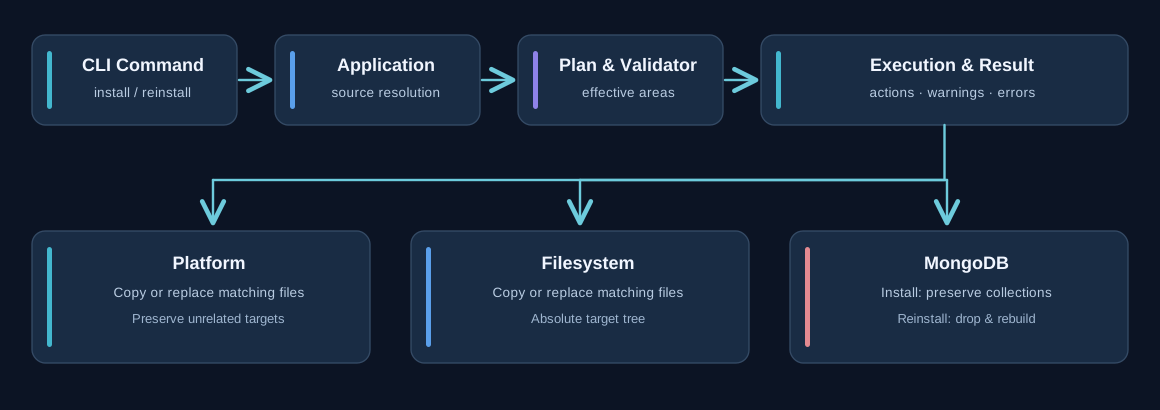
Install vs. Reinstall
| Area | Install | Reinstall |
|---|---|---|
| Platform | Copy missing files; preserve existing targets | Replace source-matched targets; preserve unrelated files |
| Filesystem | Create missing directories and copy missing files | Replace source-matched files; preserve unrelated files |
| Database | Preserve collections; upsert documents with _id, insert documents without
_id, create or confirm indexes
|
Drop each collection declared by the effective installation source, recreate it, insert documents, and recreate indexes |
Database reinstallation drops affected collections. Back up production data and review the effective installation source before running it.
Core CLI Commands
The commands below are part of the APPNETOS Core command registry. Each command expects an application name as its positional argument.
| Command | Description |
|---|---|
appnetos:install |
Install all available areas |
appnetos:install:platform |
Install platform files |
appnetos:install:filesystem |
Install filesystem assets |
appnetos:install:database |
Install MongoDB definitions |
appnetos:reinstall |
Reinstall all available areas |
appnetos:reinstall:platform |
Reinstall platform files |
appnetos:reinstall:filesystem |
Reinstall filesystem assets |
appnetos:reinstall:database |
Recreate MongoDB collections from definitions |
php bin/appnetos cmd appnetos:install appnetos-dns-control
php bin/appnetos cmd appnetos:install:platform appnetos-dns-control
php bin/appnetos cmd appnetos:install:filesystem appnetos-dns-control
php bin/appnetos cmd appnetos:install:database appnetos-dns-control

# Reinstall is an explicit replacement operation:
php bin/appnetos cmd appnetos:reinstall appnetos-dns-control
php bin/appnetos cmd appnetos:reinstall:database appnetos-dns-control
Short aliases such as install and reinstall:database are also registered.
Prefer fully qualified names in deployment scripts for clarity.
Application Sources & Custom Overrides
Installation sources are shipped with an application under its .files directory.
APPNETOS
also supports custom installation areas without changing the distributed application. For each area,
an
existing custom source takes precedence over the corresponding application source; the two sources
are
not merged.
appnetos-dns-control/.files/platform/
appnetos-dns-control/.files/filesystem/
appnetos-dns-control/.files/database/

custom/appnetos-dns-control/.files/platform/
custom/appnetos-dns-control/.files/filesystem/
custom/appnetos-dns-control/.files/database/
The installation plan resolves the effective source and target for each area. Always check whether a custom area is present before updating or reinstalling an application.
Area-Specific Behavior
Platform
Platform installation copies application-provided platform files into the shared platform directory. Existing targets are skipped during installation and replaced during reinstallation only when a matching source file exists. Symbolic links and unsafe traversal paths are rejected.
Filesystem
The directory tree below .files/filesystem/ represents absolute target paths. For
example,
.files/filesystem/usr/local/bin/deploy.sh maps to /usr/local/bin/deploy.sh.
Optional permissions metadata can be supplied through .files/filesystem.php.
Reinstallation
does not remove target files absent from the source.
Database
MongoDB collection definitions use {Collection}.json for documents and optional {Collection}.indexes.php
for indexes. Collection names derive from filenames. MongoDB Extended JSON is supported. During
installation, documents containing _id are upserted, while documents without
_id are inserted. During reinstallation, affected collections are dropped and rebuilt.
Installation Lifecycle
- Resolve the requested application and effective custom/application installation areas.
- Build the installation plan and determine existing and missing areas.
- Validate sources and operation requirements before applying changes.
- Activate application-specific configuration where required, including MongoDB configuration.
- Run the selected area installers using install or reinstall semantics.
- Collect the result: actions, skipped items, messages, warnings, errors, and counters.
Install and reinstall operations should be run with appropriate filesystem permissions and database credentials. The database operation is not a substitute for a migration system or backup procedure.
Public API Reference
The following public methods are available in the Core installation classes and installation CLI commands.
Core\Install\Application
Class & Registry
Class: Core\Install\Application
Extends: Core\Install\Application\Base
use Core\Install\Application;
use Core\Registry;

$application = Registry::get(Application::class);| Method | Description |
|---|---|
__construct() |
This file is a part of APPNETOS® (Application Internet Operating System). |
init() |
Initialize installation application resolver. |
setApplication() |
Set installation application. |
getApplication() |
Register installation application. |
getApplicationDirectory() |
Get application root directory. |
getCustomApplicationDirectory() |
Get custom application root directory. |
getApplicationFilesDirectory() |
Get application installation files directory. |
getCustomFilesDirectory() |
Get custom application installation files directory. |
getAreas() |
Get supported installation areas. |
getInitialized() |
Get initialization state. |
resolveArea() |
Resolve installation area. |
resolveAreas() |
Resolve all supported installation areas. |
usesCustomArea() |
Check whether custom installation area is used. |
hasArea() |
Check whether installation area exists. |
getAreaDirectory() |
Get installation area source directory. |
Core\Install\Plan
Class & Registry
Class: Core\Install\Plan
Extends: Core\Install\Plan\Base
use Core\Install\Plan;
use Core\Registry;

$plan = Registry::get(Plan::class);| Method | Description |
|---|---|
__construct() |
This file is a part of APPNETOS® (Application Internet Operating System). |
init() |
Initialize installation plan controller. |
build() |
Build installation plan. |
getApplication() |
Get application. |
getApplicationResolver() |
Get installation application resolver. |
getAreas() |
Get installation areas. |
getExistingAreas() |
Get existing installation areas. |
getMissingAreas() |
Get missing installation areas. |
getArea() |
Get installation area. |
hasArea() |
Check whether installation area exists. |
usesCustomArea() |
Check whether installation area uses custom source. |
getAreaSource() |
Get installation area source. |
getAreaTarget() |
Get installation area target. |
hasInstallableAreas() |
Check whether plan contains installable areas. |
getBuilt() |
Get plan built state. |
getInitialized() |
Get initialization state. |
Core\Install\Validator
Class & Registry
Class: Core\Install\Validator
Extends: Core\Install\Validator\Base
use Core\Install\Validator;
use Core\Registry;

$validator = Registry::get(Validator::class);| Method | Description |
|---|---|
__construct() |
This file is a part of APPNETOS® (Application Internet Operating System). |
init() |
Initialize installation validator. |
validate() |
Validate installation plan. |
getPlan() |
Get installation plan. |
setPlan() |
Set installation plan. |
getResult() |
Get installation result. |
setResult() |
Set installation result. |
getValidated() |
Get validation completed state. |
getInitialized() |
Get initialization state. |
Core\Install\Result
Class & Registry
Class: Core\Install\Result
Extends: Core\Install\Result\Base
use Core\Install\Result;
use Core\Registry;

$result = Registry::get(Result::class);| Method | Description |
|---|---|
__construct() |
This file is a part of APPNETOS® (Application Internet Operating System). |
init() |
Initialize installation result controller. |
start() |
Start installation result. |
finish() |
Finish installation result. |
reset() |
Reset installation result. |
addAction() |
Add successful installation action. |
addSkipped() |
Add skipped installation action. |
addMessage() |
Add informational message. |
addWarning() |
Add warning. |
addError() |
Add error. |
increment() |
Increment counter. |
setCounter() |
Set counter. |
getCounter() |
Get counter. |
isSuccessful() |
Check whether installation completed successfully. |
hasErrors() |
Check whether errors exist. |
hasWarnings() |
Check whether warnings exist. |
getDuration() |
Get installation duration. |
getApplication() |
Get application. |
getActions() |
Get successful actions. |
getSkipped() |
Get skipped actions. |
getMessages() |
Get informational messages. |
getWarnings() |
Get warnings. |
getErrors() |
Get errors. |
getCounters() |
Get counters. |
getStarted() |
Get installation started state. |
getFinished() |
Get installation finished state. |
getStartedAt() |
Get installation start time. |
getFinishedAt() |
Get installation finish time. |
getInitialized() |
Get initialization state. |
Core\Install\Platform
Class & Registry
Class: Core\Install\Platform
Extends: Core\Install\Platform\Base
use Core\Install\Platform;
use Core\Registry;

$platform = Registry::get(Platform::class);| Method | Description |
|---|---|
__construct() |
This file is a part of APPNETOS® (Application Internet Operating System). |
init() |
Initialize platform installation controller. |
install() |
Install platform files. |
reinstall() |
Reinstall platform files. |
getPlan() |
Get installation plan. |
setPlan() |
Set installation plan. |
getResult() |
Get installation result. |
setResult() |
Set installation result. |
getInitialized() |
Get initialization state. |
Core\Install\Filesystem
Class & Registry
Class: Core\Install\Filesystem
Extends: Core\Install\Filesystem\Base
use Core\Install\Filesystem;
use Core\Registry;

$filesystem = Registry::get(Filesystem::class);| Method | Description |
|---|---|
__construct() |
This file is a part of APPNETOS® (Application Internet Operating System). |
init() |
Initialize filesystem installation controller. |
install() |
Install filesystem files. |
reinstall() |
Reinstall filesystem files. |
getPlan() |
Get installation plan. |
setPlan() |
Set installation plan. |
getResult() |
Get installation result. |
setResult() |
Set installation result. |
getMetadata() |
Get filesystem metadata. |
getInitialized() |
Get initialization state. |
Core\Install\Database
Class & Registry
Class: Core\Install\Database
Extends: Core\Install\Database\Base
use Core\Install\Database;
use Core\Registry;

$database = Registry::get(Database::class);| Method | Description |
|---|---|
__construct() |
This file is a part of APPNETOS® (Application Internet Operating System). |
init() |
Initialize MongoDB installation controller. |
install() |
Install MongoDB collections. |
reinstall() |
Reinstall MongoDB collections. |
getPlan() |
Get installation plan. |
setPlan() |
Set installation plan. |
getResult() |
Get installation result. |
setResult() |
Set installation result. |
getDatabase() |
Get MongoDB database. |
setDatabase() |
Set MongoDB database. |
getCollections() |
Get discovered collection definitions. |
getInitialized() |
Get initialization state. |
Core\Cmd\Command\Install
Class & Usage
Class: Core\Cmd\Command\Install
Type: CLI command
use Core\Cmd\Command\Install;

// Executed through the APPNETOS command runtime.| Method | Description |
|---|---|
__construct() |
Constructs the CLI command. |
execute() |
Executes the installation command. |
Core\Cmd\Command\InstallPlatform
Class & Usage
Class: Core\Cmd\Command\InstallPlatform
Type: CLI command
use Core\Cmd\Command\InstallPlatform;

// Executed through the APPNETOS command runtime.| Method | Description |
|---|---|
__construct() |
Constructs the CLI command. |
execute() |
Executes the installation command. |
Core\Cmd\Command\InstallFilesystem
Class & Usage
Class: Core\Cmd\Command\InstallFilesystem
Type: CLI command
use Core\Cmd\Command\InstallFilesystem;

// Executed through the APPNETOS command runtime.| Method | Description |
|---|---|
__construct() |
Constructs the CLI command. |
execute() |
Executes the installation command. |
Core\Cmd\Command\InstallDatabase
Class & Usage
Class: Core\Cmd\Command\InstallDatabase
Type: CLI command
use Core\Cmd\Command\InstallDatabase;

// Executed through the APPNETOS command runtime.| Method | Description |
|---|---|
__construct() |
Constructs the CLI command. |
execute() |
Executes the installation command. |
Core\Cmd\Command\Reinstall
Class & Usage
Class: Core\Cmd\Command\Reinstall
Type: CLI command
use Core\Cmd\Command\Reinstall;

// Executed through the APPNETOS command runtime.| Method | Description |
|---|---|
__construct() |
Constructs the CLI command. |
execute() |
Executes the reinstallation command. |
Core\Cmd\Command\ReinstallPlatform
Class & Usage
Class: Core\Cmd\Command\ReinstallPlatform
Type: CLI command
use Core\Cmd\Command\ReinstallPlatform;

// Executed through the APPNETOS command runtime.| Method | Description |
|---|---|
__construct() |
Constructs the CLI command. |
execute() |
Executes the reinstallation command. |
Core\Cmd\Command\ReinstallFilesystem
Class & Usage
Class: Core\Cmd\Command\ReinstallFilesystem
Type: CLI command
use Core\Cmd\Command\ReinstallFilesystem;

// Executed through the APPNETOS command runtime.| Method | Description |
|---|---|
__construct() |
Constructs the CLI command. |
execute() |
Executes the reinstallation command. |
Core\Cmd\Command\ReinstallDatabase
Class & Usage
Class: Core\Cmd\Command\ReinstallDatabase
Type: CLI command
use Core\Cmd\Command\ReinstallDatabase;

// Executed through the APPNETOS command runtime.| Method | Description |
|---|---|
__construct() |
Constructs the CLI command. |
execute() |
Executes the reinstallation command. |
The seven installation components are documented from the supplied PHP sources. The eight CLI command classes were listed in the supplied API reference but their source files were not included in the Install archive.
Installation and reinstallation: practical behavior
Each installation area is resolved independently. If a matching directory exists under custom/<application>/.files/,
that complete area replaces the application's original area; files within an area are not merged.
| Area | Install | Reinstall |
|---|---|---|
| Platform, Public, Filesystem | Preserves existing target files | Overwrites matching source files; does not delete unrelated target files |
| MongoDB | Preserves collections; upserts documents with _id and inserts those without
it
|
Drops and recreates only collections defined by the effective installation source, including their indexes |
Important: Reinstalling a MongoDB area is destructive for the collections included in that area. Back up application data before executing it against an environment containing valuable data.
MongoDB import and index definitions
A JSON file in .files/MongoDB/ names its target collection. It can contain a single
document
or a list of documents and supports MongoDB Extended JSON values such as $oid and
$date.
Documents without _id cannot be idempotently updated on subsequent installations.
.files/MongoDB/AppnetosDocsContainer.json
.files/MongoDB/AppnetosDocsContainer.indexes.php
Indexes are defined explicitly in a matching PHP file; they are not automatically inferred from document or collection annotations.
<?php

declare(strict_types=1);

return [
    [
        'keys' => ['key' => 1],
        'options' => ['unique' => true],
    ],
];
Filesystem paths and permissions
Paths below .files/filesystem/ represent absolute installation targets. Optional file
modes
are declared in .files/filesystem.php, beside—not inside—the filesystem
directory.
<?php

declare(strict_types=1);

return [
    'usr/local/bin/appnetos-script' => ['mode' => 0755],
    'tmp/appnetos-test.txt' => ['mode' => 0644],
];
Existing directories retain their permissions, preventing the installer from changing modes on system
directories such as /tmp or /usr.
Application database configuration
The Platform area is installed first. APPNETOS then activates application-specific configuration and rebuilds the database service before importing MongoDB resources, so imports use the database configured for the target application.
php bin/appnetos cmd appnetos:install appnetos-docs
php bin/appnetos cmd appnetos:reinstall:database appnetos-docs