
Cmd
One command runtime. Core tools and application-specific automation.
APPNETOS provides a command-line runtime for built-in platform operations and commands supplied by individual applications. Commands are discovered from annotated PHP classes and registered through generated definition files.
Architecture and execution
The cmd runtime loads core command definitions and, when an application is active, its
application definitions. The registry resolves command names and aliases; the resolver instantiates
the
selected command and the runtime invokes its execute() method.
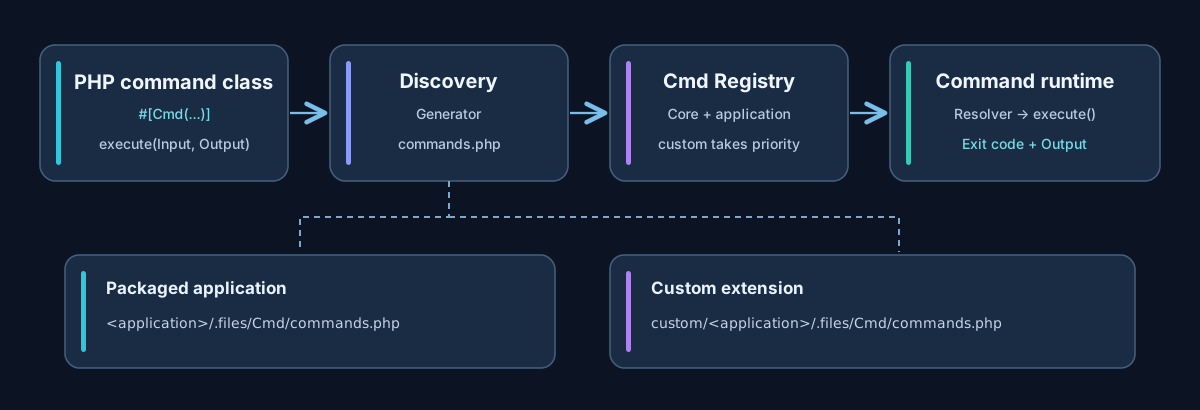
Core commands and application commands
Core commands are supplied by APPNETOS and are available in the command runtime. Applications can ship additional commands without modifying the Core. Both types use the same command infrastructure and must avoid conflicting names or aliases.
| Scope | Definition file | Description |
|---|---|---|
| Core | appnetos/.files/Cmd/commands.php |
Platform-provided commands |
| Application package | <application>/.files/Cmd/commands.php |
Definitions distributed with an application |
| Custom application | custom/<application>/.files/Cmd/commands.php |
Local application extensions and overrides |
The registry checks the custom definition first, then the packaged definition, separately for Core and application. A custom file takes precedence over its packaged counterpart; it is not an automatic merge of both files.
Defining a command
Annotate a concrete PHP class with Core\Cmd\Annotation\Cmd and provide an execute(Core\Cmd\Input
$input, Core\Cmd\Output $output): int method. The following is an illustrative
application
command:
use Core\Cmd;
use Core\Cmd\Annotation\Cmd as CmdAnnotation;
use Core\Cmd\Input;
use Core\Cmd\Output;

#[CmdAnnotation(
    name: 'example:hello',
    description: 'Print a greeting',
)]
class HelloCommand
{
    public function execute(Input $input, Output $output): int
    {
        $name = $input->getArgument(0) ?? 'developer';
        $output->success('Hello, ' . $name);

        return Cmd::EXIT_SUCCESS;
    }
}
The annotation supports name, description, aliases,
active and hidden. An inactive command is not executable; a hidden command
can
be omitted from ordinary listings.
Discovery, generation and distribution
After adding or changing annotated command classes, regenerate the application definition. The
generator
discovers commands for the specified application and writes custom/<application>/.files/Cmd/commands.php.
php bin/appnetos cmd appnetos:cmd:generate appnetos-dns-control
php bin/appnetos cmd appnetos:cmd:list appnetos-dns-control
php bin/appnetos cmd appnetos:cmd:list --all
Developing an application
Generate the definition in custom/, then copy the verified
commands.php into the application package at <application>/.files/Cmd/
before distribution.
Customizing an installed application
Keep the generated definition under custom/<application>/.files/Cmd/.
Do not change the original application package. Regenerate the custom definition
when
command classes change.
For example, appnetos-dns-control/.files/Cmd/commands.php belongs to the
distributable DNS Control application; local changes belong under custom/appnetos-dns-control/.files/Cmd/commands.php.
Input, output and exit codes
Input exposes positional arguments, named options and the selected application.
Output provides standard, informational, success, warning, error and diagnostic
messages.
Commands return integer exit codes: Cmd::EXIT_SUCCESS (0),
Cmd::EXIT_FAILURE
(1) or Cmd::EXIT_INVALID_INPUT (2).
Core command reference
The following list is limited to the 17 commands in the supplied APPNETOS Core definition. Applications may provide additional commands; these are intentionally not enumerated here.
| Category | Command | Description |
|---|---|---|
| Command management | appnetos:cmd:generate |
Generate command definitions for an application |
| Command management | appnetos:cmd:list |
List core or application commands |
| Diagnostics | appnetos:diagnose |
Check the command runtime |
| Installation | appnetos:install |
Install an application |
| Installation | appnetos:install:database |
Install application database resources |
| Installation | appnetos:install:filesystem |
Install application filesystem resources |
| Installation | appnetos:install:platform |
Install application platform resources |
| Reinstallation | appnetos:reinstall |
Reinstall an application |
| Reinstallation | appnetos:reinstall:database |
Reinstall database resources |
| Reinstallation | appnetos:reinstall:filesystem |
Reinstall filesystem resources |
| Reinstallation | appnetos:reinstall:platform |
Reinstall platform resources |
| OpenAPI | appnetos:openapi:generate |
Generate OpenAPI definitions |
| Mailer | appnetos:mailer:test |
Test the configured mail transport |
| Workers | appnetos:worker:generate |
Generate worker definitions |
| Workers | appnetos:worker:list |
List registered workers |
| Workers | appnetos:worker:run |
Run a registered worker |
| Workers | appnetos:worker:cleanup |
Clean up completed worker jobs |
Installation and worker commands are introduced here and explained in greater depth on their dedicated pages.
Public API Reference
Core\Cmd
Class & Registry
Class:
Core\Cmd
Extends:
Core\Cmd\Base
use Core\Cmd;
use Core\Registry;

$cmd = Registry::get(Cmd::class);| Method | Description |
|---|---|
execute() |
Execute command |
__construct() |
Constructor |
init() |
Initialize component |
execute() |
Execute command |
getExitCode() |
Access or modify get exit code |
getExecuted() |
Access or modify get executed |
getInitialized() |
Access or modify get initialized |
Core\Cmd\Annotation\Cmd
Class & Registry
Class:
Core\Cmd\Annotation\Cmd
Extends:
Core\Cmd\Annotation\Cmd
use Core\Cmd\Annotation\Cmd;
use Core\Registry;

$cmd = Registry::get(Cmd::class);| Method | Description |
|---|---|
__construct() |
Constructor |
getName() |
Access or modify get name |
getDescription() |
Access or modify get description |
getAliases() |
Access or modify get aliases |
getActive() |
Access or modify get active |
getHidden() |
Access or modify get hidden |
Core\Cmd\Registry
Class & Registry
Class:
Core\Cmd\Registry
Extends:
Core\Cmd\Registry\Base
use Core\Cmd\Registry;
use Core\Registry;

$registry = Registry::get(Registry::class);| Method | Description |
|---|---|
__construct() |
Constructor |
init() |
Initialize component |
get() |
Access or modify get |
has() |
Access or modify has |
getCommands() |
Access or modify get commands |
getAliases() |
Access or modify get aliases |
getCoreCommandFile() |
Access or modify get core command file |
hasCoreCommandFile() |
Access or modify has core command file |
getApplicationCommandFile() |
Access or modify get application command file |
hasApplicationCommandFile() |
Access or modify has application command file |
getInitialized() |
Access or modify get initialized |
Core\Cmd\Discovery
Class & Registry
Class:
Core\Cmd\Discovery
Extends:
Core\Cmd\Discovery\Base
use Core\Cmd\Discovery;
use Core\Registry;

$discovery = Registry::get(Discovery::class);| Method | Description |
|---|---|
__construct() |
Constructor |
init() |
Initialize component |
discover() |
Access or modify discover |
autoloadDiscoveryClass() |
Access or modify autoload discovery class |
setApplication() |
Access or modify set application |
getApplication() |
Access or modify get application |
getDirectories() |
Access or modify get directories |
getAutoloadClasses() |
Access or modify get autoload classes |
getInitialized() |
Access or modify get initialized |
Core\Cmd\Generator
Class & Registry
Class:
Core\Cmd\Generator
Extends:
Core\Cmd\Generator\Base
use Core\Cmd\Generator;
use Core\Registry;

$generator = Registry::get(Generator::class);| Method | Description |
|---|---|
__construct() |
Constructor |
init() |
Initialize component |
generate() |
Access or modify generate |
getGeneratedFile() |
Access or modify get generated file |
exists() |
Access or modify exists |
getInitialized() |
Access or modify get initialized |
Core\Cmd\Resolver
Class & Registry
Class:
Core\Cmd\Resolver
Extends:
Core\Cmd\Resolver\Base
use Core\Cmd\Resolver;
use Core\Registry;

$resolver = Registry::get(Resolver::class);| Method | Description |
|---|---|
__construct() |
Constructor |
init() |
Initialize component |
resolve() |
Access or modify resolve |
getCommandName() |
Access or modify get command name |
getDefinition() |
Access or modify get definition |
getCommand() |
Access or modify get command |
getResolved() |
Access or modify get resolved |
getInitialized() |
Access or modify get initialized |
Core\Cmd\Input
Class & Registry
Class:
Core\Cmd\Input
Extends:
Core\Cmd\Input\Base
use Core\Cmd\Input;
use Core\Registry;

$input = Registry::get(Input::class);| Method | Description |
|---|---|
__construct() |
Constructor |
init() |
Initialize component |
getApplication() |
Access or modify get application |
getCommand() |
Access or modify get command |
isCoreCommand() |
Access or modify is core command |
getRawArguments() |
Access or modify get raw arguments |
getArguments() |
Access or modify get arguments |
getArgument() |
Access or modify get argument |
hasArgument() |
Access or modify has argument |
getOptions() |
Access or modify get options |
getOption() |
Access or modify get option |
getStringOption() |
Access or modify get string option |
getBoolOption() |
Access or modify get bool option |
getOptionValues() |
Access or modify get option values |
hasOption() |
Access or modify has option |
getInitialized() |
Access or modify get initialized |
Core\Cmd\Output
Class & Registry
Class:
Core\Cmd\Output
Extends:
Core\Cmd\Output\Base
use Core\Cmd\Output;
use Core\Registry;

$output = Registry::get(Output::class);| Method | Description |
|---|---|
__construct() |
Constructor |
init() |
Initialize component |
write() |
Access or modify write |
writeln() |
Access or modify writeln |
info() |
Access or modify info |
success() |
Access or modify success |
warning() |
Access or modify warning |
error() |
Access or modify error |
critical() |
Access or modify critical |
verbose() |
Access or modify verbose |
debug() |
Access or modify debug |
setQuiet() |
Access or modify set quiet |
getQuiet() |
Access or modify get quiet |
setVerbose() |
Access or modify set verbose |
getVerbose() |
Access or modify get verbose |
getInitialized() |
Access or modify get initialized |
Docker and background execution
APPNETOS Docker currently needs explicit registration of worker processes. The planned mechanism for applications to contribute Docker Compose or build fragments is future work and is not part of the current command API.
CLI syntax and argument handling
Core commands run directly through the command context. Application commands include the application name before the command identifier.
php bin/appnetos cmd appnetos:cmd:list
php bin/appnetos cmd appnetos-dns-control dns:configuration:validate
Positional arguments are interpreted by the individual command. Quote arguments containing
whitespace.
Options are boolean flags beginning with --; they can appear between positional
arguments
and do not accept separate values.
php bin/appnetos cmd appnetos:diagnose "Hello World"
php bin/appnetos cmd appnetos:diagnose first --force second --verbose
Common flags and command visibility
| Flag | Behavior |
|---|---|
--verbose |
Enables additional command output. |
--quiet |
Suppresses normal output while retaining error messages; takes precedence over verbose mode. |
--force |
Command-specific override of normal protection or confirmation behavior. |
--all |
Includes normally hidden entries where supported, such as in appnetos:cmd:list
--all.
|
Hidden commands are omitted from the default list but remain executable. Inactive commands cannot be executed. Command aliases invoke the same implementation as the primary command name.
After changing command metadata, regenerate the application command definitions:
php bin/appnetos cmd appnetos:cmd:generate appnetos-dns-controlThe generator replaces generated custom command definitions; it does not overwrite application source classes.