
Custom Configuration & Installation
Customize application platform installation resources without modifying the original application package, and understand how APPNETOS installs and reinstalls them into the active platform directory.
APPNETOS distinguishes installation resources from runtime
configuration. The installer selects a platform source for an application and copies its
files to the shared platform directory. At runtime, Core\Config\Base reads configuration
files from platform/config/, not directly from the custom installation area.
Installation Source Selection
The platform installation source is resolved by the installation plan. If custom/<application>/.files/platform/
exists, it becomes the exclusive source for that application's platform installation.
Otherwise, the installer uses the platform resources supplied by the application.
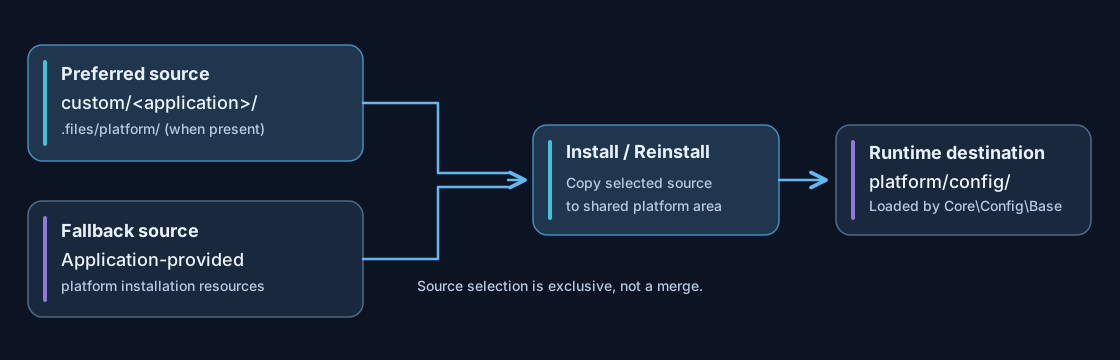
A custom platform directory is not a partial overlay on the original installation resources. If you provide a custom source, include every platform file from the original source that your installation still requires.
custom/
└── my-application/
    └── .files/
        └── platform/
            └── config/
                ├── my-application.php
                └── my-application.production.php

platform/
└── config/
    ├── appnetos.php
    ├── my-application.php
    └── my-application.production.php
The tree illustrates an application-specific custom installation source and its destination. Actual filenames depend on the application and environment.
Installation and Reinstallation Behavior
The installer traverses the selected platform source recursively and creates missing target directories. The handling of existing files depends on whether the operation is an installation or a reinstallation.
| Condition | Installation | Reinstallation |
|---|---|---|
| Source file does not exist in target | Copy the file | Copy the file |
| Source file already exists in target | Preserve the existing file; skip copying | Replace the target file with the source file |
| Target file is absent from selected source | Leave untouched | Leave untouched |
| Required target directory is missing | Create it | Create it |
Before reinstalling an application, compare the selected source with the
current files under platform/ and back up environment-specific changes. Reinstallation
does
not delete unrelated target files.
Runtime Configuration Files
Once installed, configuration is loaded from platform/config/ in the following order. Later
files override matching earlier values through array_replace_recursive().
appnetos.php— global defaultsappnetos.<environment>.php— optional global environment overlay<application>.php— optional application configuration<application>.<environment>.php— optional application environment overlay
At least one core APPNETOS configuration file must exist. Application-specific files are optional. The
configuration loader does not consult custom/ at runtime.
The environment overlay is a runtime configuration layer; it is separate from the installer's choice between custom and packaged platform resources.
Recommended Customization Workflow
- Identify the application. Use the active application identifier, including its alias when applicable, to determine the intended installation area.
- Prepare the custom source. Create
custom/<application>/.files/platform/and include the complete set of platform installation resources needed by that application. - Adapt configuration. Keep shared defaults and environment-specific values in the
appropriate PHP configuration files under
config/. - Review the selected source. Remember that the presence of the custom platform directory prevents fallback to the original application source.
- Install or reinstall deliberately. A normal installation preserves existing files; a reinstallation replaces files that exist in the selected source.
- Validate the result. Inspect
platform/config/, verify environment values and test the application in its intended runtime context.
Do not edit packaged Core or application installation resources as your long-term customization mechanism. Such changes can be lost during updates.
Filesystem and Path Safety
The platform installer recursively processes directories and regular files. It does not support symbolic links in the installation source, and it rejects unsafe relative paths containing parent-directory traversal segments or null bytes.
Keep installation resources within their intended application source directory and review file permissions for the target platform directory. Do not store sensitive credentials in a publicly served directory.
Common Pitfalls
| Situation | Explanation |
|---|---|
Changes in custom/ have no immediate runtime effect |
The runtime reads installed files from platform/config/; changes to
installation resources must first be deployed to the target.
|
| Expected packaged files are missing after custom installation | The custom platform source replaces the packaged source; the two source trees are not combined. |
| Configuration does not update on normal installation | Existing target files are intentionally skipped. Review and deploy the changes deliberately. |
| Old files remain after reinstallation | Reinstallation overwrites files present in the selected source but does not delete unrelated files from the target. |
| Application config appears to override global settings unexpectedly | Later application and environment files take precedence during runtime merging. |
For the complete loading rules, see Configuration Files & Loading. For supported configuration keys, see Configuration Reference.