
Configuration Files & Loading
How APPNETOS combines global Core defaults, environment settings and optional application-specific runtime configuration.
Runtime Configuration
APPNETOS loads runtime configuration from ./platform/config/. The global
appnetos configuration supplies defaults for applications. An application may supply
additional files to override only the settings it needs to change.
Configuration files are PHP files returning arrays. They are distinct from
./platform/application/ application registration and routing definitions and from ./platform/bootstrap/
bootstrap class definitions. Those other configuration systems have their own file-selection rules.
platform/config/
├── appnetos.php
├── appnetos.docker.php
├── example-application.php
└── example-application.docker.php
The docker suffix is an example. APPNETOS uses the
active runtime environment name to determine the matching file suffix.
Loading Order & Override Priority
The runtime loads Core files first and application files second. Within each pair, the environment-specific file is applied after the base file. Later values take precedence over matching earlier values.
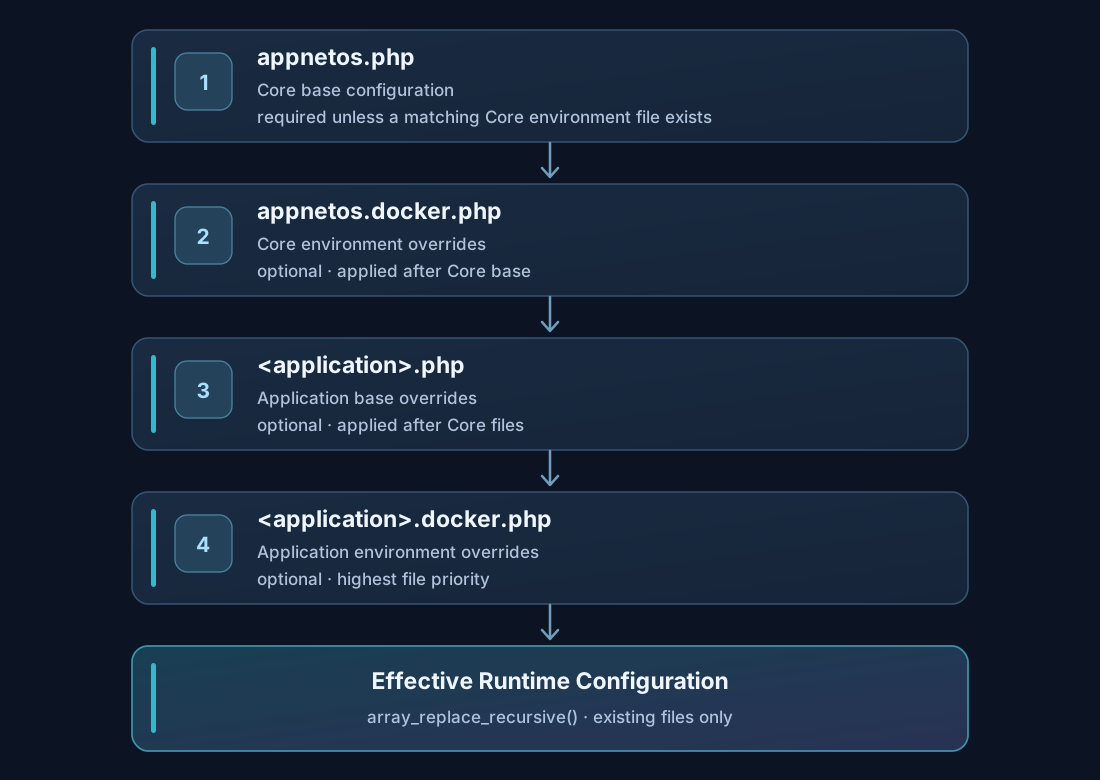
| Order | File | Purpose | Required? |
|---|---|---|---|
| 1 | appnetos.php |
Global Core defaults | Core configuration required; base or matching environment file must exist |
| 2 | appnetos.docker.php |
Core environment overrides | No, if a Core base file exists |
| 3 | example-application.php |
Application defaults and overrides | No |
| 4 | example-application.docker.php |
Application environment overrides | No |
APPNETOS requires at least one matching global Core configuration file. Missing application files do not prevent an application from inheriting Core defaults. Files for environments other than the active environment are not loaded.
Recursive Merging
Core\Config\Base merges the returned arrays with array_replace_recursive().
Nested associative keys are preserved unless a later file supplies a replacement value for the same key.
Core base file
return [
    'contexts' => [
        'shared' => [
            'mongodb' => [
                'uri' => 'mongodb://db:27017/',
                'database' => 'appnetos',
            ],
        ],
    ],
];
Application override
return [
    'contexts' => [
        'shared' => [
            'mongodb' => [
                'database' => 'example_app',
            ],
        ],
    ],
];
The resulting MongoDB configuration retains the Core URI but uses example_app as its
database name. The application does not need to repeat unchanged values.
Explicit values such as false,
null and empty strings can replace existing values. An empty array does not remove
inherited array entries. Numerically indexed arrays are also processed by array_replace_recursive(),
so their indexes matter.
Contexts & Configuration Classes
Runtime configuration is organized under contexts.shared, contexts.app and
contexts.admin. Shared settings cover infrastructure such as MongoDB and Redis; app and
admin settings configure their corresponding base runtime contexts.
Core\Config\Base implements file loading and parameter assignment. The Core app
configuration inherits shared and app settings. The Core admin configuration additionally
exposes administrative settings. Applications may extend the appropriate Core configuration classes to
introduce their own configuration properties.
PHP configuration classes can be extended, while the PHP configuration files are merged recursively. These are separate mechanisms.
Missing Files & Environment Fallback
If an application does not provide runtime configuration files, it uses the global Core configuration. A matching environment file is optional and does not need to repeat the full base configuration. A missing global Core configuration raises an error when neither the base file nor the matching environment file exists.
For example, when the active environment is docker, appnetos.production.php and
example-application.production.php are ignored. The runtime considers only base files and
matching .docker.php files.
Installed Files vs. Installation Resources
APPNETOS reads its active runtime configuration from ./platform/config/. The installer can
populate this directory from application-provided installation resources or from a corresponding custom
installation area. It does not make ./custom/ an additional runtime configuration search
path.
They may be replaced during updates. Keep project-specific installation
resources under ./custom/, and review installed configuration before deployment or
reinstallation.
For installation source selection, custom overrides and reinstall behavior, see Custom Configuration & Installation. For individual parameters, see Configuration Reference.