
Translations
Predictable fallback files, application overrides and optional cross-application language-aware caching.
Layered PHP translation files
Core\Translations registers translation directories and loads PHP arrays for the active
language. For de_de, files are loaded in this order; later values replace earlier values
with
the same key.
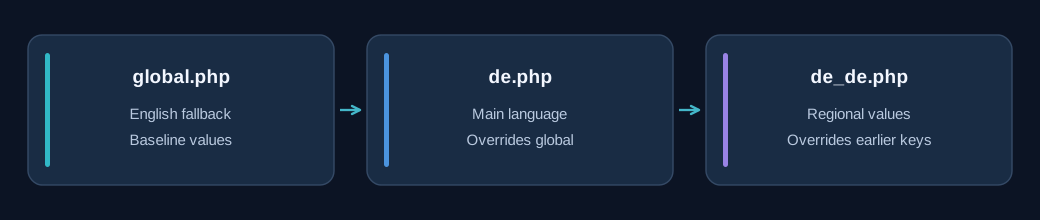
Missing files are skipped. A translation file must return a PHP array; invalid return values or load failures raise a translations exception.
Directory registration and overrides
Directories are processed in registration order. A later registered directory may replace keys defined by an earlier one, including keys from its more specific locale file. This makes application-specific overrides possible while keeping shared Core translations as a starting point.
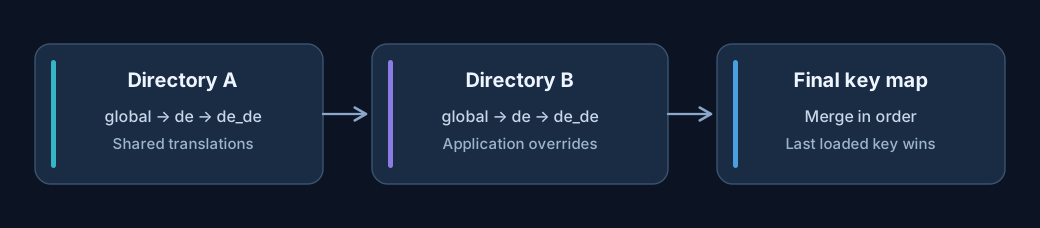
add() normalizes relative paths against APPNETOS_ROOT, ignores missing
directories
and avoids registering a directory twice. addMany() adds directories sequentially.
Example translation files
// translations/global.php
return ['welcome' => 'Welcome', 'save' => 'Save'];

// translations/de.php
return ['welcome' => 'Willkommen'];

// translations/de_de.php
return ['save' => 'Speichern'];
After loading all three files for de_de, the merged result contains welcome =
Willkommen and save = Speichern.
Public API
$translations = Registry::get(\Core\Translations::class);
$translations->add('my-application/translations');
$translations->addMany(['my-application/overrides']);
$title = $translations->get('welcome', 'Welcome');
$exists = $translations->has('welcome');
$all = $translations->getAll();
$directories = $translations->getDirectories();
reload() re-reads all currently registered directories and updates the cache. clearRuntime()
clears the in-memory directory list and translations, but does not invalidate the persisted cache.
Optional language-aware cache
When a concrete context enables translation caching, the controller restores a cached directory list and
merged translation array for the active language. A directory already registered from that cache is not
loaded again through add(). New directories are loaded and saved into the shared cache
state.
The cache key uses the translation cache type, the translations controller identifier and
the
active language.
Cache persistence is disabled by default in the base class and must be enabled by a concrete implementation. Editing a PHP translation file does not automatically force a reload of an already registered cached directory; use an appropriate reload or cache invalidation strategy.
Rendering and translation coverage
Merged translations can be made available to Twig through the shared translations render variable. APPNETOS Core applications ship with 81 language translations plus a global English fallback. Applications can add their own directories and selectively override keys without changing the Core translation files.
Public API Reference
Core\Translations
Class & Registry
Class:
Core\Translations
Extends:
Core\Translations\Base
use Core\Translations;
use Core\Registry;

$translations = Registry::get(Translations::class);| Method | Description |
|---|---|
add(string $directory): bool |
Register and load one translation directory; return whether it was added. |
addMany(array $directories): void |
Register translation directories in the given order. |
get(string $key, mixed $default = null): mixed |
Return a translation value or the provided default. |
has(string $key): bool |
Check whether a translation key exists. |
getAll(): array |
Return the merged translation values. |
getDirectories(): array |
Return registered translation directories. |
clearRuntime(): void |
Clear runtime directories and translation values without clearing persisted cache. |
reload(): void |
Reload the registered translation directories and update the cache. |