
Functions Bootstrap
The Functions Bootstrap loads built-in APPNETOS Core functions and optional application-specific PHP function files before Core initialization. It provides a straightforward way to add globally callable helpers to an application without creating additional service classes.
Purpose and Execution
The Functions Bootstrap is step 12 of the APPNETOS bootstrap sequence. It executes after the Registry
Bootstrap and before the Core Bootstrap. It first obtains the built-in Core function configuration and
then,
if an application is active, its optional function configuration. For each configuration, it selects the
shared definitions followed by the definitions for the active base context.
Existing files are included using require_once.
Core function files are always part of the configuration, even when an application has no function configuration of its own. The application configuration adds files; it does not replace the built-in Core function definitions.
Built-in Core Functions
The Core definitions are provided directly by Bootstrap\Function\FunctionBootstrap:
protected function loadCoreFunctions(): array
{
    return [
        'application' => 'appnetos',
        'contexts' => [
            'shared' => [
                'appnetos/shared/function/base.php',
                'appnetos/shared/function/debug.php',
            ],
            'app' => [],
            'admin' => [],
        ],
    ];
}| File | Responsibility | Examples |
|---|---|---|
appnetos/shared/function/base.php |
Lightweight runtime-state and path helpers. | runtime(), get_environment(), get_application(),
get_context(),
get_base_context(), get_runtime_id(), get_root_dir()
|
appnetos/shared/function/debug.php |
Global debug helpers, including temporary buffering of early debug values. | dump(), dump_flush(), is_debug() |
The base helpers read the existing runtime state or bootstrap path constants; they do not maintain a
second
runtime state. The debug helpers can buffer dump values before the Debug controller is available and
forward
them later using dump_flush(). The detailed behavior of individual helpers belongs in the
Core
function reference.
Application Function Configuration
An application can register additional files using platform/function/<application>.php.
The following example uses the application example-application:
<?php

declare(strict_types=1);

return [
    'application' => 'example-application',
    'contexts' => [
        'shared' => [
            'example-application/shared/function/helpers.php',
        ],
        'app' => [
            'example-application/app/function/storefront.php',
        ],
        'admin' => [
            'example-application/admin/function/administration.php',
        ],
    ],
];
Shared functions are loaded in every active base context. The app and admin
groups
are loaded only when the corresponding base context is active. Specialized runtime contexts use their
resolved base context: for example, an admin-rest runtime mapped to the admin
base
context uses the admin function group.
Recommended Directory Structure
example-application/
├── shared/
│   └── function/
│       └── helpers.php
├── app/
│   └── function/
│       └── storefront.php
└── admin/
    └── function/
        └── administration.php
Place shared functions in shared/function/ and base-context-specific functions in <application>/<context>/function/.
This is the recommended project organization, not a directory constraint enforced by the bootstrap.
Configured file paths are resolved relative to APPNETOS_ROOT.
Defining and Calling a Function
Example file: example-application/shared/function/helpers.php
<?php

declare(strict_types=1);

if (!function_exists('example_format_reference')) {
    function example_format_reference(string $reference): string
    {
        return strtoupper(trim($reference));
    }
}
After the file has been loaded, application code in the active runtime can call the helper directly:
$reference = example_format_reference(' order-123 ');
// ORDER-123
No Registry lookup or service instantiation is needed for a global function.
Loading Sequence
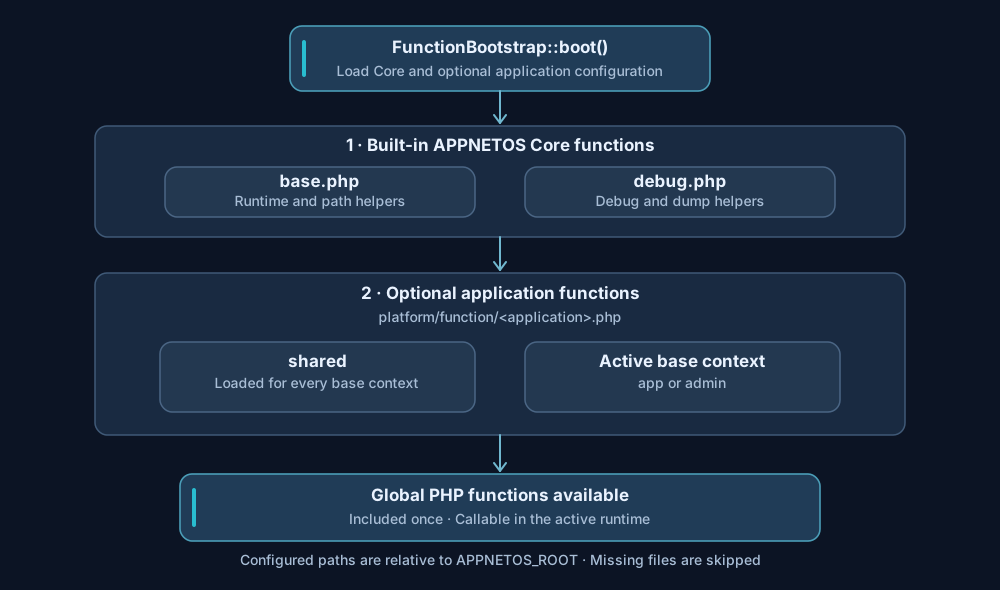
The bootstrap processes the Core configuration before the application configuration. Within each
configuration, shared entries precede entries for the resolved base context. Each existing
configured file is loaded once through require_once.
Environment-Specific Configuration
When an environment-specific configuration exists, it replaces the entire default application function configuration; it is not merged with the default file.
platform/function/example-application.php
platform/function/example-application.production.php
In this example, the second file is used when APPNETOS_ENVIRONMENT is
production.
The built-in Core function configuration remains active regardless of this override.
Validation and Missing Files
| Condition | Behavior |
|---|---|
| No application function configuration | Allowed; only the built-in Core function files are configured. |
| Configuration does not return an array | Throws an exception. |
Missing or mismatched application key |
Throws an exception. |
Missing or invalid contexts structure |
Throws an exception. |
| Active function group is not an array | Throws an exception. |
| Configured function file entry is not a non-empty string | Throws an exception. |
| Configured function file does not exist | Skipped without loading. |
Global Function Scope and Development Guidance
Function groups determine which files are included in the active PHP runtime. They do not create isolated PHP function namespaces. Once declared, global functions are available throughout that runtime. Use unique, descriptive, application-prefixed names to prevent collisions with Core helpers or other included functions.
Guarding declarations with function_exists() can prevent a redeclaration error, but it does
not
make conflicting function names safe: the first definition remains active. Keep helpers lightweight,
avoid
side effects during file inclusion, and use classes or services when behavior requires object state or
more
complex dependencies.
The Functions Bootstrap runs before Core initialization. Although the Registry Bootstrap has already run, function files should not assume that all Core services or application runtime services have been created.
Related Documentation
See Registry Bootstrap for the preceding initialization step and Core Bootstrap for the next stage of the bootstrap sequence.