
Ajax
Annotation-driven asynchronous communication with minimal application code, context-aware authentication, and an integrated JavaScript client.
APPNETOS exposes individual controller methods through a PHP attribute. The AJAX runtime resolves the requested controller and method, checks the security token and authentication policy, creates only the requested controller instance, and sends the response. There is no need to initialize every application or build a separate AJAX endpoint for each interaction.
How it works
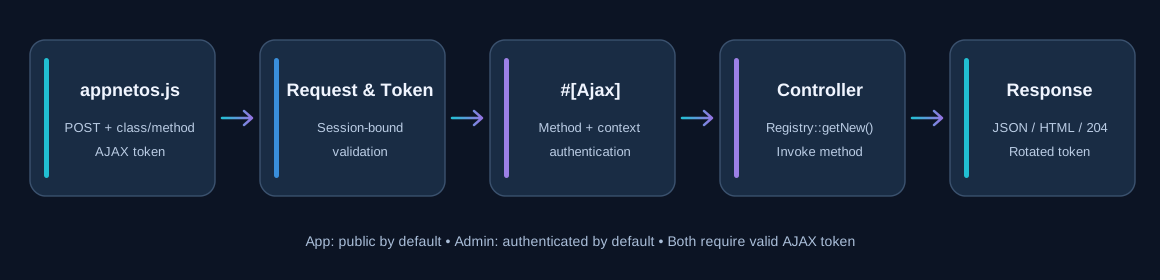
appnetos.jssubmits a POST to the current page with the requestedclassandmethod.- The request includes
X-Appnetos-Ajax: 1and a session-bound AJAX token. - The AJAX runtime validates the request, token, target method, and its context-specific
#[Ajax]annotation. - The runtime checks whether authentication is required and instantiates the selected controller
via
Registry::getNew(). - The method executes and the response is returned as JSON, HTML/text, or an empty 204 response.
Only the requested controller is instantiated by the AJAX dispatcher. Its own dependencies may still be initialized as required; this does not mean that all applications are loaded.
Context-specific authentication
The user argument controls whether an authenticated user is required. Its default is
deliberately different between the public app and administrative admin
contexts.
| Context | Annotation | Authentication |
|---|---|---|
app |
#[Ajax] |
Not required (default user: false) |
app |
#[Ajax(user: true)] |
Required |
admin |
#[Ajax] |
Required (default user: true) |
admin |
#[Ajax(user: false)] |
Not required by the annotation; use only when explicitly intended |
An AJAX token is not an authorization policy. Publicly callable methods must validate their inputs and enforce any necessary object-level permissions. Administrative methods should normally retain the authenticated default.
PHP: expose a method
Apply the attribute to a public controller method. No additional route declaration is needed for the APPNETOS AJAX dispatcher.
use Core\Annotation\Ajax;
use Core\Annotation\NoReturn;

#[Ajax]
#[NoReturn]
public function isDeploymentRequired(): void
{
    $this->_deploymentState->init();

    $this->json([
        'isDeploymentRequired' => $this->_deploymentState->isDeploymentRequired(),
    ]);
}
This example returns the current DNS deployment state for a live UI update. The
#[NoReturn]
annotation reflects the explicit response-and-exit pattern used by the controller. For methods that
return values directly, the AJAX response controller serializes arrays/objects to JSON, strings to
HTML,
and null to HTTP 204.
JavaScript: built-in AJAX helpers
The global appnetos instance provides ready-to-use methods. Supply the fully qualified
controller class name, method name, and optional request data.
| Method | Description |
|---|---|
appnetos.ajaxElement(className, method, elementId, data = {}) |
Insert the returned HTML into an element. |
appnetos.ajaxFunction(className, method, callback, data = {}) |
Pass the text response to a callback. |
appnetos.ajaxJson(className, method, callback, data = {}) |
Parse JSON and pass it to a callback. |
appnetos.ajaxForm(className, method, callback, form) |
Serialize a form and submit it asynchronously. |
appnetos.ajaxRequest(className, method, data = {}, responseType = 'text', source =
'ajaxRequest') |
Low-level helper used by the other methods. |
JSON example
appnetos.ajaxJson(
    'AppnetosDnsControl\\Admin\\Apps\\Example',
    'isDeploymentRequired',
    (result) => {
        console.log(result.isDeploymentRequired);
    }
);
Replace the illustrative class name with the actual controller FQCN. The dispatcher invokes the method without positional arguments; access submitted values through the application's request facilities.
HTML example
appnetos.ajaxElement(
    'Vendor\\Application\\App\\Example',
    'renderList',
    'results',
    { page: 2 }
);
ajaxForm() supports normal named form fields, checked checkboxes/radios, multi-select
fields, and file inputs. Its serializer uses the first file for a file field.
Request security and token rotation
APPNETOS AJAX tokens are bound to the current session, application and base context. The shared token
controller can create, validate, rotate and destroy them. The JavaScript client sends X-Appnetos-Ajax-Token,
then reads the updated token from the response header after execution.
The request is posted to window.location.href, not to a separate application-wide AJAX
URL.
Errors are reported through ajaxError(); with debug enabled, additional diagnostics are
logged to the browser console.
Because the token rotates with responses, coordinate overlapping requests when necessary. The shared JavaScript client updates its stored token from each response, but concurrent requests may have been sent with the same earlier token.
Core API Reference
Core\Ajax
Class & Registry
Class: Core\Ajax
Extends: Core\Ajax\Base
use Core\Ajax;
use Core\Registry;

$ajax = Registry::get(Ajax::class);| Method | Description |
|---|---|
__construct() |
Constructs the component. |
init() |
Initializes the AJAX component. |
isAjax() |
Checks whether the request is an AJAX request. |
getAjax() |
Returns the AJAX request information. |
getToken() |
Returns the AJAX token. |
dispatch() |
Dispatches the AJAX request. |
Core\Ajax\Request
Class & Registry
Class: Core\Ajax\Request
Extends: Core\Ajax\Request\Base
use Core\Ajax\Request;
use Core\Registry;

$request = Registry::get(Request::class);| Method | Description |
|---|---|
__construct() |
Constructs the component. |
init() |
Initializes the AJAX request. |
isAjax() |
Checks whether the request is an AJAX request. |
getToken() |
Returns the request token. |
getClass() |
Returns the requested class. |
getMethod() |
Returns the requested method. |
getData() |
Returns the request data. |
validateAjax() |
Validates the AJAX request. |
validateToken() |
Validates the request token. |
validateClass() |
Validates the requested class. |
validateMethod() |
Validates the requested method. |
Core\Ajax\Response
Class & Registry
Class: Core\Ajax\Response
Extends: Core\Ajax\Response\Base
use Core\Ajax\Response;
use Core\Registry;

$response = Registry::get(Response::class);| Method | Description |
|---|---|
__construct() |
Constructs the component. |
init() |
Initializes the AJAX response. |
send(mixed $result) |
Sends the AJAX response. |
Core\Ajax\Token
Class & Registry
Class: Core\Ajax\Token
Extends: Core\Ajax\Token\Base
use Core\Ajax\Token;
use Core\Registry;

$token = Registry::get(Token::class);| Method | Description |
|---|---|
__construct() |
Constructs the component. |
get() |
Returns the current token. |
create() |
Creates a token. |
validate(string $token) |
Validates a token. |
rotate() |
Rotates the token. |
destroy() |
Destroys the token. |
Core\Annotation\Ajax
Class & Usage
Class: Core\Annotation\Ajax
Type: PHP attribute (not a Registry service)
use Core\Annotation\Ajax;

#[Ajax(user: false)]| Method | Description |
|---|---|
__construct(bool $user = false) |
Configures whether an authenticated user is required. |
The administrative annotation uses user: true by default.
The public API list reflects the supplied shared AJAX classes and the app annotation;
context-specific subclasses are not enumerated here.
Troubleshooting
| Symptom | Check |
|---|---|
| Method cannot be called | Confirm the method is public, exists, and has the context-appropriate
#[Ajax]
annotation.
|
| Authentication required | Check the context default, the user attribute, and the active session. |
| Invalid or expired token | Ensure the initial page supplies APPNETOS_AJAX_TOKEN and requests use the
built-in client headers.
|
| Unexpected JSON parsing error | Use ajaxJson() only when the PHP method returns JSON. |
| Missing HTML update | Check the target element ID and the returned HTML. |