
Authentication
Credential validation, ForceSignIn and the standard redirect workflow.
Standard Sign-In Workflow
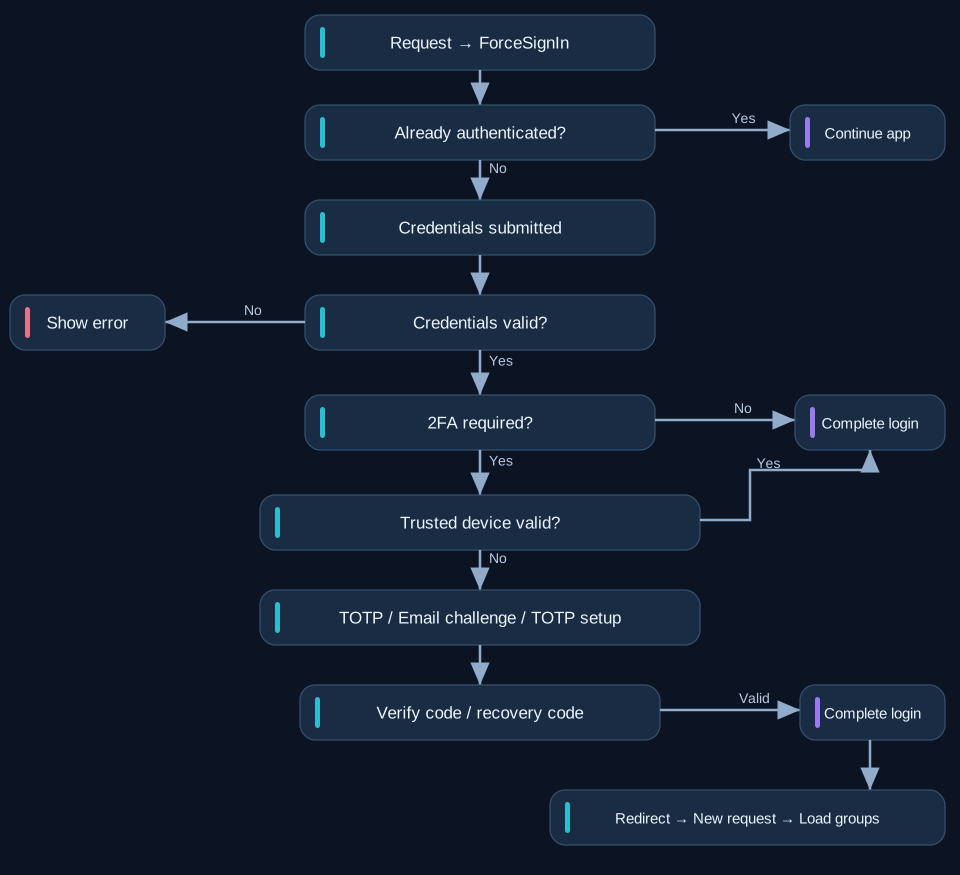
ForceSignIn is placed at the beginning of a protected content chain. If a user is
already
authenticated, rendering continues. Otherwise it displays sign-in or the pending 2FA view.
Credential
verification is delegated to Core\User\Auth.
The standard ForceSignIn::signIn() explicitly calls Auth::login($email, $password,
true), enabling second-factor handling. Custom login implementations must deliberately
pass
true when 2FA is supported.
Completion & Redirect
If the user does not require 2FA, the login completes and the frontend receives a redirect action. If 2FA is required, the session remains pending until a valid TOTP or email code is provided, or an eligible trusted device is validated. The successful redirect begins a new request and loads the user and active groups.
The ForceSignIn CoreApp is a reusable presentation and HTTP workflow. Its protected template and collection hooks are extension points, not public API methods.
ForceSignIn Public Endpoints
The public AJAX handlers are annotated for unauthenticated requests and return render or redirect actions.
ForceSignIn (5 methods)
| Public method signature | Description |
|---|---|
public function __invoke(): ViewSlot|string|null |
Invoke ForceSignIn |
public function signIn(): void |
Public API operation. |
public function verifyTotp(): void |
Public API operation. |
public function verifyEmail(): void |
Public API operation. |
public function resendEmailCode(): void |
Public API operation. |
Public API Reference
Core\User\Auth
Class & Registry
Class:
Core\User\Auth
Extends:
Core\User\Auth\Base
use Core\User\Auth;
use Core\Registry;

$auth = Registry::get(Auth::class);| Method | Description |
|---|---|
public function init(): void |
Initialize authentication controller |
public function setTwoFactorDeviceCollection(TwoFactorDeviceCollection|null
$collection): void |
Set two-factor device collection |
public function login(string $login, string $password, bool
                                        $twoFactorAvailable =
false): bool |
Login |
public function logout(): void |
Logout |
public function hasUser(): bool |
Check if authenticated user exists |
public function isAuthenticated(): bool |
Check if user is authenticated |
public function isTwoFactorPending(): bool |
Check if two-factor authentication is pending |
public function getPendingUser(): UserDocument|null |
Get pending two-factor authentication user |
public function getPendingTwoFactorProvider(): string|null |
Get pending two-factor authentication provider |
public function completeTwoFactor( string $code, bool $rememberDevice = false,
                                        int
$trustedDeviceLifetime = 2592000 ): bool |
Complete two-factor authentication |
public function startTotpSetup(string $issuer, string|null $account = null):
array|null |
Start TOTP two-factor authentication setup |
public function completeTotpSetup( string $code, bool $rememberDevice = false,
                                        int
$trustedDeviceLifetime = 2592000 ): bool |
Complete TOTP two-factor authentication setup |
public function getEmailTwoFactorAvailable(): bool |
Get email two-factor authentication availability |
public function startEmailChallenge(bool $force = false): bool |
Start email two-factor authentication challenge |
public function completeEmailTwoFactor( string $code, bool $rememberDevice =
                                        false,
int $trustedDeviceLifetime = 2592000 ): bool |
Complete email two-factor authentication |
Implementation Details
The following technical reference expands the existing guide with authentication lifecycle, state management, and provider behavior.
Authentication Flow
Complete Flow
Request protected URI
        ↓
Force Sign In
        ↓
Already authenticated?
 ├── yes
 │    ↓
 │  continue application/content chain
 │
 └── no
      ↓
    Sign-in form
      ↓
    Resolve active user
      ↓
    User exists?
     ├── no  → authentication failed
     └── yes
           ↓
        Verify password
           ↓
        Password valid?
         ├── no
         │    ↓
         │  failed-login handling
         │
         └── yes
              ↓
           afterPasswordVerified()
              ↓
           Is 2FA required?
            ├── no
            │    ↓
            │  authenticated session
            │    ↓
            │  runtime user
            │    ↓
            │  afterLogin()
            │
            └── yes
                 ↓
              Trusted device available?
                 ↓
              Trusted device valid?
               ├── yes
               │    ↓
               │  authenticated session
               │    ↓
               │  runtime user
               │
               └── no
                    ↓
                 pending 2FA session
                    ↓
                 Primary provider
                 ├── TOTP
                 │    ├── initialized
                 │    │      ↓
                 │    │   code input
                 │    │
                 │    └── not initialized
                 │           ↓
                 │       temporary secret
                 │           ↓
                 │       QR enrollment
                 │           ↓
                 │       first valid code
                 │           ↓
                 │       persist secret
                 │
                 └── Email
                      ↓
                   mailer available?
                    ├── no → technical error
                    └── yes
                          ↓
                       generate challenge
                          ↓
                       send code
                          ↓
                       code input
                    ↓
                 2FA successful
                    ↓
                 optional trusted device
                    ↓
                 authentication session complete
                    ↓
                 runtime user assigned
                    ↓
                 afterLogin()
                    ↓
                 redirect / continue
Failed Login
When no user exists, authentication returns false.
When the user exists but password verification fails:
afterFailedLogin()
→ increaseFailedLoginAttempts()
→ persist user
Password Success
After successful password verification:
afterPasswordVerified()
→ markLogin()
→ persist user
This occurs before the two-factor decision.
Two-Factor Decision
2FA is required only when:
two-factor infrastructure enabled for login flow
AND
user has 2FA enabled
AND
at least one supported provider is configured
Provider infrastructure availability is not used to silently bypass configured 2FA.
For example, when email 2FA is configured but the mailer is unavailable, authentication remains pending and the user receives an error.
Trusted Device
A valid trusted device is evaluated after password verification and before interactive 2FA.
2FA required
→ trusted-device cookie
→ token hash lookup
→ user + token + expiration valid?
When valid, interactive 2FA is skipped.
Finalization
All successful second-factor flows use the same finalization behavior:
optional trusted-device creation
→ complete authentication session
→ assign runtime user
→ afterLogin()
Authentication Lifecycle Hooks
Overview
Core\User\Auth\Base provides lifecycle hooks for application- or context-specific
authentication behavior.
afterPasswordVerified()
protected function afterPasswordVerified(
    UserDocument $document,
): void
Executed after successful password verification and before the final two-factor decision.
The shared implementation currently:
markLogin()
→ persist user document
afterFailedLogin()
protected function afterFailedLogin(
    UserDocument|null $document,
): void
Executed after a failed authentication attempt.
When the user document could be resolved, the shared implementation:
increaseFailedLoginAttempts()
→ persist user document
When no user could be resolved, no persistent document is modified.
afterLogin()
protected function afterLogin(
    UserDocument $document,
): void
Executed only after authentication is fully completed.
This means:
No 2FA required
→ after password authentication

2FA required
→ after successful second-factor verification
It is not executed while authentication is still pending.
beforeLogout()
protected function beforeLogout(
    UserDocument $document,
): void
Executed before the runtime user and authentication session are cleared.
afterLogout()
protected function afterLogout(
    UserDocument $document,
): void
Executed after logout completes.
Usage
Lifecycle hooks allow mapped authentication child controllers to add application-specific behavior without duplicating the shared authentication flow.
Authentication Class Mapping
Overview
APPNETOS authentication uses class mapping to separate shared Core behavior from application- and context-specific dependencies.
Shared Base classes define reusable behavior.
Mapped child classes provide runtime-specific collections, configuration or integration.
Registry Usage
Applications resolve mapped Core controllers:
Registry::get(Core\User::class);
Registry::get(Core\User\Auth::class);
Registry::get(Core\User\Auth\Session::class);
Registry::get(Core\User\Auth\Password::class);
Registry::get(Core\User\Auth\TwoFactor::class);
Shared Base classes should not be resolved directly.
User Collection Mapping
Core\User\Base defines:
protected function getCollection(): UserCollection|null
{
    return null;
}
The mapped child supplies the application/context-specific user collection.
Group Collection Mapping
Core\User\Group\Base follows the same pattern:
protected function getCollection(): GroupCollection|null
{
    return null;
}
Email Provider Mapping
The shared email provider never decides whether app or admin mailer settings are used.
The shared provider exposes hooks:
protected function getMailer(): array|null
{
    return null;
}

protected function getMailerUsable(): bool
{
    return false;
}
The mapped runtime child supplies the correct configuration.
Conceptually:
Email Provider Base
        ↓
Mapped Child
        ├── app context   → app mailer configuration
        └── admin context → admin mailer configuration
Design Rule
Shared Base classes should not infer runtime context when that decision can be supplied by a mapped child.
This keeps the shared Core reusable and prevents context-specific branching from spreading through the architecture.