
Security Bootstrap
The seventh bootstrap step applies early, context-specific HTTP access restrictions before APPNETOS initializes autoloading, class extensions and the core runtime.
Purpose and Execution
Bootstrap\Security\SecurityBootstrap runs after Session
Bootstrap and before Autoload
Bootstrap. Application Bootstrap has already resolved the active application and exact runtime
context. Security Bootstrap reads the optional installed security definition and applies its rules
before ordinary application execution.
Security is configured per runtime context, not globally for an application. A context without a security definition receives no early Basic, Bearer or IP restrictions from this bootstrap. Process runtimes and requests without an active application are skipped.
// Simplified execution order in SecurityBootstrap::boot().
if ($runtimeState->getProcess()) {
    return;
}

// After resolving the active application and exact context:
$this->handleIpAccess($contextSecurity);
$this->handleBasicAuth($contextSecurity);
$this->handleBearerAuth($contextSecurity);
The handlers above are invoked sequentially in the current implementation. The recommended configuration activates only one HTTP authentication mechanism per context.
Request Security Flow
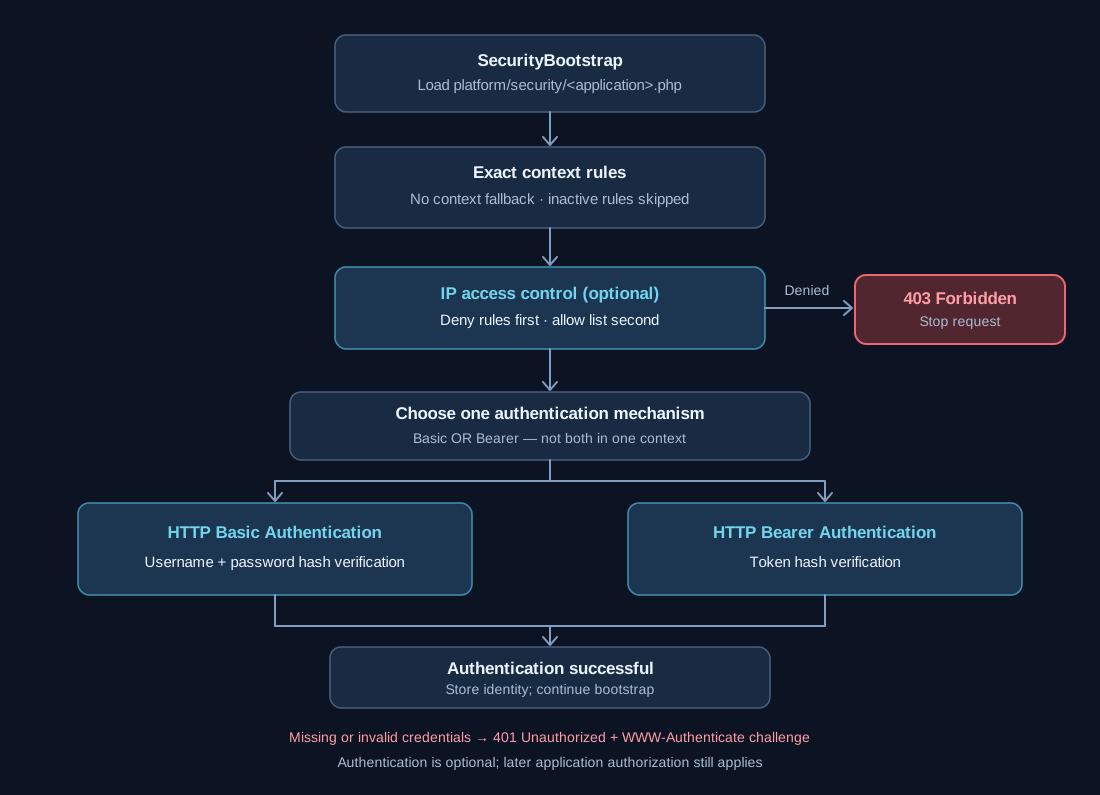
The diagram shows the configured IP check followed by a single chosen HTTP authentication method. Denied IPs receive HTTP 403; failed authentication receives HTTP 401. Successful requests continue through the remaining bootstrap sequence.
Configuration File Resolution
Security Bootstrap reads the installed runtime configuration from platform/security/.
It does not read application installation templates from .files/ and does not resolve
custom source files directly.
platform/security/appnetos-api-dev.php
platform/security/appnetos-api-dev.docker.php
When APPNETOS_ENVIRONMENT is docker and the environment-specific file exists,
it replaces the standard configuration in full. Files are not merged. If neither file
exists, no early security restrictions are configured by this bootstrap.
Every context and rule needed in the selected environment must appear in the selected file. A missing context does not inherit rules from the default file.
Complete Application Security Example
APPNETOS API Dev illustrates the typical separation between browser administration and administrative
REST access. The admin runtime context uses Basic Authentication; admin-rest
uses Bearer Authentication.
<?php

return [
    'application' => 'appnetos-api-dev',
    'contexts' => [
        'admin' => [
            'basic_auth' => [
                'active' => true,
                'realm' => 'APPNETOS API Dev',
                'users' => [
                    'admin' => '<password_hash>',
                ],
            ],
        ],
        'admin-rest' => [
            'bearer_auth' => [
                'active' => true,
                'tokens' => [
                    'admin' => '<token_hash>',
                ],
            ],
        ],
    ],
];
The placeholder values represent hashes created with password_hash(),
not plaintext credentials. Never copy published example credentials into a production configuration.
Configuration Reference
| Key | Type | Behavior |
|---|---|---|
application |
string |
Required; must match the active application and configuration filename stem. |
contexts |
array |
Required map of exact runtime-context names. |
contexts.<context>.basic_auth.active |
bool |
Optional; enabled only when strictly true. |
basic_auth.realm |
string |
Optional non-empty challenge realm; defaults to APPNETOS. |
basic_auth.users |
array |
Required non-empty username-to-password-hash map when Basic is active. |
contexts.<context>.bearer_auth.active |
bool |
Optional; enabled only when strictly true. |
bearer_auth.tokens |
array |
Required non-empty token-name-to-token-hash map when Bearer is active. |
contexts.<context>.ip_access.active |
bool |
Optional; enabled only when strictly true. |
ip_access.allow |
array |
Optional list of allowed IP addresses and CIDR ranges; a non-empty list requires a match. |
ip_access.deny |
array |
Optional list of denied IP addresses and CIDR ranges; checked before allow rules. |
Only the security definition for contexts[<resolved-runtime-context>] is considered.
There is no fallback to default_context or the base_context. Invalid active
rule definitions can throw bootstrap exceptions.
HTTP Basic Authentication
Basic Authentication reads a username and password from PHP authentication variables or the Authorization:
Basic header. The configured password hash is verified using password_verify().
A successful authentication stores the username under the basic key of the runtime security
identity.
'admin' => [
    'basic_auth' => [
        'active' => true,
        'realm' => 'APPNETOS DNS Control',
        'users' => [
            'admin' => '<password_hash>',
        ],
    ],
],
A missing or invalid credential produces 401 Unauthorized and a WWW-Authenticate:
Basic challenge with the configured realm. A realm is a browser authentication label, not a
username.
HTTP Bearer Authentication
Bearer Authentication reads the token from the Authorization: Bearer header and verifies it
against the configured token hashes with password_verify(). The token name is an
internal identifier; the submitted secret token is not stored in RuntimeState.
'admin-rest' => [
    'bearer_auth' => [
        'active' => true,
        'tokens' => [
            'admin' => '<token_hash>',
        ],
    ],
],
A missing or invalid token produces 401 Unauthorized with WWW-Authenticate:
Bearer. A successful request records the configured token name as the bearer
runtime security identity.
One Authentication Method per Context
Both use the HTTP Authorization
header, so a normal request cannot present both credential schemes in that header. Choose exactly
one
method for each protected context. Separate contexts may use different methods.
| Context setup | Recommended use |
|---|---|
| Basic active, Bearer inactive | Supported pattern |
| Bearer active, Basic inactive | Supported pattern |
| Both inactive | No HTTP authentication from these two mechanisms |
| Both active | Do not configure; ordinary Authorization-header authentication cannot satisfy both |
Implementation detail: The current
SecurityBootstrap
does not explicitly reject this combination during configuration validation. It invokes both handlers
sequentially. This is a configuration rule, not a claimed built-in exclusivity exception.
IP Access Control
IP rules can be used independently or alongside the chosen authentication method. The bootstrap reads the
client address from $_SERVER['REMOTE_ADDR'], evaluates deny entries first, and then applies
an optional allow list. IPv4 and IPv6 addresses and CIDR notation are supported.
'admin' => [
    'ip_access' => [
        'active' => true,
        'allow' => [
            '192.0.2.0/24',
            '2001:db8::/32',
        ],
        'deny' => [
            '192.0.2.55',
        ],
    ],
    'basic_auth' => [
        'active' => true,
        'realm' => 'APPNETOS Administration',
        'users' => ['admin' => '<password_hash>'],
    ],
],
The addresses above are documentation-only ranges. Replace them with the actual trusted network ranges.
IP filtering uses REMOTE_ADDR
directly and does not trust X-Forwarded-For. Ensure the server exposes the intended
client
IP before relying on these restrictions. Invalid IP entries do not match.
A denied client or a client that fails a non-empty allow list receives 403 Forbidden before
HTTP authentication is evaluated.
Generate and Replace Credentials
APPNETOS application packages include administrative security defaults. The initial Basic credentials are
admin:admin, and the initial Bearer token is admin. Replace both before
exposing an installation to untrusted networks.
php -r "echo password_hash('replace-with-a-strong-password', PASSWORD_DEFAULT) . PHP_EOL;"
php -r "echo password_hash('replace-with-a-long-random-token', PASSWORD_DEFAULT) . PHP_EOL;"
Insert the resulting hashes into basic_auth.users and bearer_auth.tokens,
respectively. The token-name key can remain a descriptive identifier, but the actual token secret must
be independently generated and securely distributed.
Default credentials are publicly known and are not suitable for production. Changing only Basic Authentication does not rotate a Bearer token configured for a different runtime context, or vice versa.
Request Outcomes and Runtime Effects
| Condition | Outcome |
|---|---|
| Process runtime or no active application | Security Bootstrap skips early HTTP checks. |
| No security file or no exact-context entry | No early restrictions from this bootstrap. |
| IP denied / not on non-empty allow list | 403 Forbidden. |
| Basic credentials missing or invalid | 401 Unauthorized with Basic challenge. |
| Bearer token missing or invalid | 401 Unauthorized with Bearer challenge. |
| All configured checks pass | Security identity is stored in RuntimeState; bootstrap continues. |
| Malformed active configuration | Bootstrap exception (where explicitly validated). |
These are early HTTP restrictions. Passing them does not bypass application authorization, permissions, or later security checks. CORS preflight handling occurs earlier in the bootstrap sequence; a permitted preflight is not a successful authenticated REST request.
Customization and Update Safety
Original configuration files under <application>/.files/ are
part of the replaceable application package. Changes there can be lost during updates, replacements
or
reinstalls. Maintain reusable custom installation files under ./custom/ using APPNETOS
customization. For an installed environment, update the effective runtime configuration directly
under
./platform/security/ when appropriate.
Security Bootstrap only reads the installed files in platform/security/; it does not load
customization sources. For the custom installation workflow, see the separate Application
Customization and Custom Installation documentation.