
Swagger UI
Explore, understand and test APPNETOS REST APIs interactively.
appnetos-api-dev provides a developer-facing Swagger UI for OpenAPI definitions generated
from APPNETOS REST Collections. It helps developers inspect available operations, understand request and
response schemas and send test requests to the target application.
How the pieces fit together
Swagger UI is a consumer of the generated OpenAPI contract, not the component that discovers REST Collections or implements endpoints. The generator builds a context-specific definition; the developer application presents it; the browser sends requests to the target REST application.
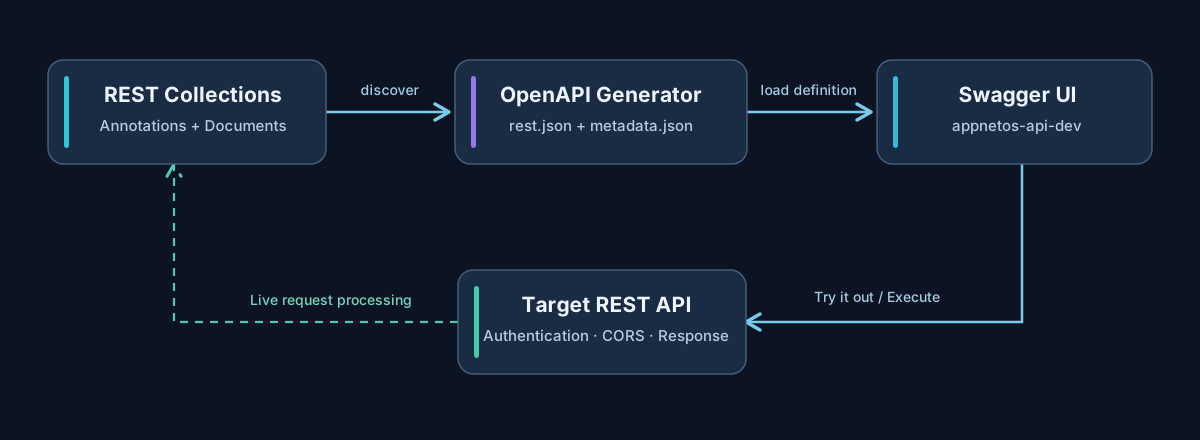
The appnetos-api-dev application
appnetos-api-dev is a dedicated APPNETOS application for browsing generated API
definitions
and testing endpoints. Its developer interface is separate from the application that actually serves
the
REST resource.
Definitions are generated per application and REST context. For example, rest and admin-rest
have independent contracts, routes and security requirements. Select the definition matching the API
you
intend to test.
Generate and discover definitions
Before opening Swagger UI, generate the OpenAPI files for the target application and context. From the APPNETOS project root:
php bin/appnetos cmd appnetos:openapi:generate my-application
php bin/appnetos cmd appnetos:openapi:generate my-application admin-rest
The generator writes a definition and metadata under the application-specific output directory:
custom/<application>/.files/OpenAPI/<context>/
├── rest.json
└── metadata.json
Open the developer application and select the generated definition. If a definition is missing, confirm that generation completed successfully, the requested REST context exists and the files are accessible to the developer application.
Inspect an endpoint
Swagger UI groups the operations described by the selected OpenAPI definition. Expand an operation to inspect its HTTP method, route, parameters, request body, possible responses and associated Document schemas. The displayed contract reflects the last successful generation, not necessarily every subsequent source-code change.
| Element | What to check |
|---|---|
| Server | The host and context route of the REST application you want to call. |
| Operation | HTTP method and resource path exposed by the annotated REST Collection. |
| Parameters | Required path or query values and their documented types. |
| Request body | Expected JSON structure and documented property constraints. |
| Responses | Documented status codes and response schemas. |
Send a test request
- Select the appropriate application/context definition and verify the server URL.
- Expand the desired REST operation and select Try it out.
- Provide required parameters or a JSON request body.
- Configure authorization when the endpoint requires it.
- Select Execute and inspect the request URL, status code, response headers and response body.
Use a development or staging target for write operations. POST, PUT, PATCH
and DELETE may modify persistent data; Swagger UI does not simulate them.
Authentication and CORS
Depending on the target application's context-specific security configuration, a REST endpoint may require Basic Authentication or a Bearer token. Use Swagger UI's Authorize feature when the generated definition advertises a supported security scheme.
When the developer application and target API use different origins, the browser enforces CORS. The target application's REST context must allow the developer application's origin and any required methods and headers. For authorized requests, verify that the necessary authorization header is permitted. Browser preflight failures occur before the intended REST operation is executed.
Authentication and CORS solve different problems: valid credentials do not override a browser CORS rejection, and an allowed origin does not grant access to a protected endpoint.
Troubleshooting
| Symptom | Recommended check |
|---|---|
| Definition not listed | Generate the correct application/context and check the resulting rest.json
and
metadata.json.
|
| Endpoint missing or outdated | Check the REST Collection annotation and regenerate the OpenAPI definition. |
| Unexpected target host | Review application routes and the generated OpenAPI servers entries. |
| 401 or 403 | Verify credentials, the configured authentication scheme and REST authorization requirements. |
| CORS / preflight error | Check the target REST context's allowed origins, methods and headers; inspect browser network diagnostics. |
| 400 / validation failure | Compare submitted parameters and JSON values against the documented schema and server response. |
| 404 | Confirm the application host, context slug, resource slug and HTTP method. |
Public API Methods
Swagger UI is an interactive developer interface, not an additional public PHP Core API. The REST and OpenAPI services it uses are documented in REST Collections and OpenAPI Generator. Application-specific UI controller methods are intentionally not listed here without their source implementation.