
Logging
Centralized, application-aware logging with context-specific files, custom channels, safe message normalization and optional DebugBar integration.
Overview
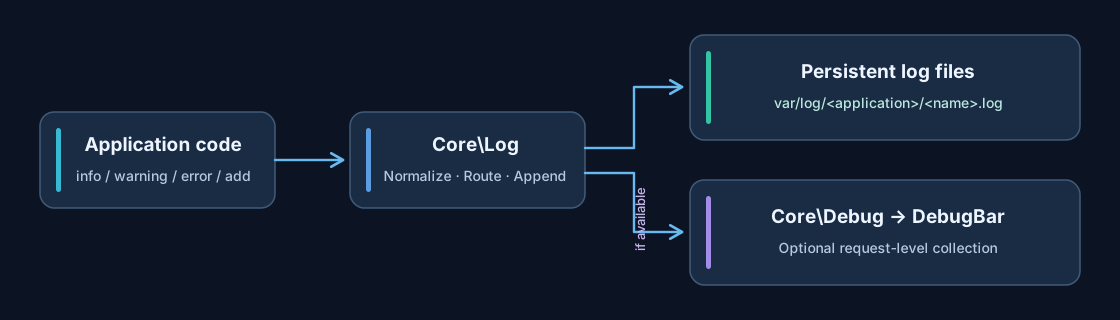
The shared Core\Log service writes persistent runtime logs for APPNETOS applications. By
default, entries are separated by application and runtime context. Developers can optionally select
a
custom log filename without changing the active application directory.
Logging does not require debug mode. If the debug controller exposes log collection, entries are also forwarded to it for request-level inspection.
File locations and naming
Log files are stored below APPNETOS_VAR/log. The application name selects the directory;
the
current runtime context selects the default filename.
APPNETOS_VAR/log/
├── appnetos-dns-control/
│   ├── admin.log
│   ├── worker.log
│   ├── deployment.log
│   └── monitoring.log
└── appnetos-cms/
    └── app.log
For example, a log entry in the admin context of appnetos-dns-control is
written to APPNETOS_VAR/log/appnetos-dns-control/admin.log. Passing
deployment
as the custom name writes to deployment.log in the same application directory.
Application, context and custom log names are normalized to lowercase; characters other than letters
a-z, digits, underscores and hyphens are replaced with hyphens. Missing application
names
fall back to appnetos; missing contexts or empty sanitized names fall back to
runtime.
Writing log entries
Resolve the shared log controller from the APPNETOS registry, then use a convenience method or add().
use Core\Log;
use Core\Registry;

$log = Registry::get(Log::class);

$log->info('Application initialized');
$log->warning('Deployment pending');
$log->error('Remote service unavailable');
$log->critical('Deployment failed');
Custom log files
$log->info('Deployment started', 'deployment');
$log->warning('Zone requires synchronization', 'monitoring');
$log->error('Deployment failed', 'deployment');
Custom types
$log->add('Scheduled job completed', 'audit', 'scheduler');
$log->add('Default type is info');
Custom types are lowercased for normalization and rendered in uppercase in the file. An omitted or
empty
type defaults to info.
Structured data and exceptions
$log->info([
    'job_id' => $jobId,
    'status' => 'finished',
], 'worker');

try {
    // Application operation
} catch (\Throwable $exception) {
    $log->error($exception, 'worker');
}
Strings are written directly. A Throwable is represented by its message, file and line
number. Other values are JSON-encoded with unescaped Unicode and slashes; print_r() is
used
if encoding fails.
Log entry format
[2026-11-06 08:30:00] INFO: Deployment started
[2026-11-06 08:30:01] WARNING: Zone requires synchronization
[2026-11-06 08:30:02] AUDIT: Scheduled job completed
Each line includes the server-local timestamp, uppercase type and normalized message. The logger appends to existing files instead of replacing their contents.
Filesystem behavior and failure handling
Automatic directories
Missing application log directories are created recursively with
requested
mode 0775 (subject to the process umask).
Concurrent writes
FILE_APPEND | LOCK_EX appends each entry while requesting
an
exclusive filesystem lock.
Fallback reporting
Directory and file write failures are reported through native PHP error_log()
rather than recursively logging through APPNETOS.
Ensure the PHP process can write to APPNETOS_VAR/log. Native error-log
fallback
does not guarantee that the original APPNETOS entry was persisted.
DebugBar integration
During initialization, the shared logger resolves Core\Debug through the registry. After
writing an entry, it calls addLog($message, $type) when that method is available. This
allows the DebugBar's Log collector to show messages associated with the current request.
The persistent log file remains the primary destination. DebugBar collection is optional and depends on the active debug implementation.
Do not write passwords, API keys, session tokens or unnecessary personal data to persistent logs or the DebugBar. Limit filesystem access and configure log retention according to your deployment requirements.
Public API Reference
Core\Log
Class & Registry
Class:
Core\Log
Extends:
Core\Log\Base
use Core\Log;
use Core\Registry;

$log = Registry::get(Log::class);| Method | Description |
|---|---|
init(): void |
Initialize the logger and resolve the shared debug controller; subsequent calls are idempotent. |
add(mixed $message, string|null $type = null, string|null $name = null):
                                        void
|
Write a normalized message with a default or custom type and optional custom log filename. |
info(mixed $message, string|null $name = null): void |
Write an INFO entry. |
warning(mixed $message, string|null $name = null): void |
Write a WARNING entry. |
error(mixed $message, string|null $name = null): void |
Write an ERROR entry. |
critical(mixed $message, string|null $name = null): void |
Write a CRITICAL entry. |
These methods are defined on the shared Core\Log\Base class. File path resolution,
formatting and normalization are protected implementation details.
Practical recommendations
- Use the default context log for general runtime messages and a custom filename for operational domains such as deployments or monitoring.
- Prefer structured arrays for machine-readable context, but avoid secrets and sensitive payloads.
- Log exceptions at the point where they can be meaningfully handled; logging alone does not recover an operation.
- Configure log rotation and retention externally for long-running production deployments.
- Check filesystem permissions and the PHP error log if expected entries do not appear.