
Request & Response
From incoming HTTP data to predictable JSON results.
APPNETOS separates REST request access, operation execution, result metadata and HTTP response serialization into dedicated Core components.
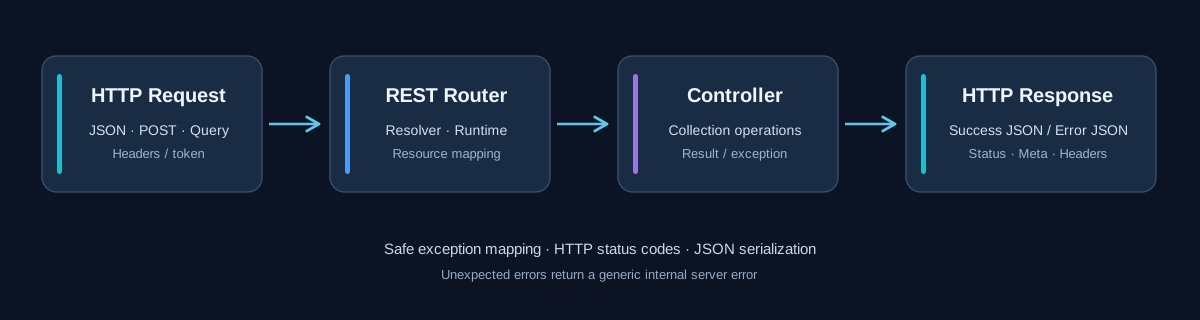
Request lifecycle
An incoming HTTP request is routed to an active REST resource. The resolver prepares runtime context and checks applicable constraints; the controller delegates supported operations to the mapped Collection. The REST response layer then serializes the result or error as JSON.
Request data
Core\Rest\Request\Base provides HTTP method and URI access, case-insensitive header lookup, query
parameters, POST parameters, raw body and decoded JSON body. The raw body and JSON decoding are
cached
for the current request. getInput() resolves values in this order: JSON body, POST,
then
query parameters. getInputs() returns a non-empty JSON object/array when available,
otherwise POST data; it does not merge query parameters.
Validation
Validation is not a single universal REST Request method. Collection operations and their Document
definitions determine the accepted fields and constraints. The REST controller also interprets list
options, filters, sorting and pagination. Document-specific validation details should be read
alongside
the Document and Collection references; do not assume that malformed JSON automatically raises an
exception, since getJsonBody() returns an empty array for undecodable input.
Response formats
success() emits JSON with success: true and normalized data.
When
supplied a REST Result object, it uses that object’s status and includes meta when
non-empty. error() emits success: false and an error object
containing a message and context. The json() method sets the HTTP status, marks the
response as sent and terminates processing through the shared response controller.
Error handling
A REST exception is rendered using its safe message, mapped HTTP status and context. Unexpected
throwables are intentionally returned as a generic HTTP 500 error with reason:
internal_server_error; internal exception details are not exposed in the response. Rate
limiting can add X-RateLimit-Limit, X-RateLimit-Remaining and Retry-After
headers.
Example request and response
The following is an illustrative response envelope, not a guarantee of a particular application endpoint.
{
  "success": true,
  "data": {"id": "example-id"}
}
{
"success": false,
"error": {
"message": "Invalid request.",
"context": {}
}
}A REST Result can attach pagination or other metadata using setMeta() and
addMeta(), and can override the HTTP status with setStatus().
Public API Reference
Core\Rest\Request
Class & Registry
Class:
Core\Rest\Request
Extends:
Core\Rest\Request\Base
use Core\Rest\Request;
use Core\Registry;

$request = Registry::get(Request::class);| Method | Description |
|---|---|
public function __construct() |
Initialize |
public function getMethod(): string |
Get method |
public function getUri(): string |
Get uri |
public function getHeader(string $name): string|null |
Get header |
public function getHeaders(): array |
Get headers |
public function getQuery(string $key, mixed $default = null): mixed
|
Get query |
public function getQueries(): array |
Get queries |
public function getPost(string $name, mixed $default = null): mixed
|
Get post |
public function getPosts(): array |
Get posts |
public function getRawBody(): string |
Get raw body |
public function getJsonBody(): array |
Get json body |
public function getInput(string $name, mixed $default = null): mixed
|
Get input |
public function getInputs(): array |
Get inputs |
public function getBearerToken(): string|null |
Get bearer token |
public function isJson(): bool |
Is json |
Core\Cache
Class & Registry
Class:
Core\Rest\Response
Extends:
Core\Rest\Response\Base
use Core\Rest\Response;
use Core\Registry;

$response = Registry::get(Response::class);| Method | Description |
|---|---|
public function __construct() |
Initialize |
public function init(): void |
Init |
public function success( mixed $data = null, int $status = 200, ):
                                        never
|
Success |
public function error( string $message, int $status = 500, array $context =
                                        [], ):
never |
Error |
public function exception(RestException $exception): never |
Exception |
public function throwable(Throwable $throwable): never |
Throwable |
public function json( array $data, int $status = 200, ): never |
Json |
public function setRateLimitHeaders( int $limit, int $remaining, int $seconds,
                                        ):
void |
Set rate limit headers |
public function getSent(): bool |
Get sent |
public function isSent(): bool |
Is sent |
public function getResponse(): Response |
Get response |
Core\Rest\Result
Class & Registry
Class:
Core\Rest\Result
Extends:
Core\Rest\Result\Base
use Core\Rest\Result;
use Core\Registry;

$result = Registry::get(Result::class);| Method | Description |
|---|---|
public function __construct() |
Initialize |
public function setData(mixed $data): static |
Set data |
public function getData(): mixed |
Get data |
public function setMeta(array $meta): static |
Set meta |
public function getMeta(): array |
Get meta |
public function addMeta(string $key, mixed $value): static |
Add meta |
public function setStatus(int $status): static |
Set status |
public function getStatus(): int |
Get status |
public function hasMeta(): bool |
Has meta |
public function hasData(): bool |
Has data |
public function toArray(): array |
To array |