
Redis
APPNETOS Core infrastructure component: Redis.
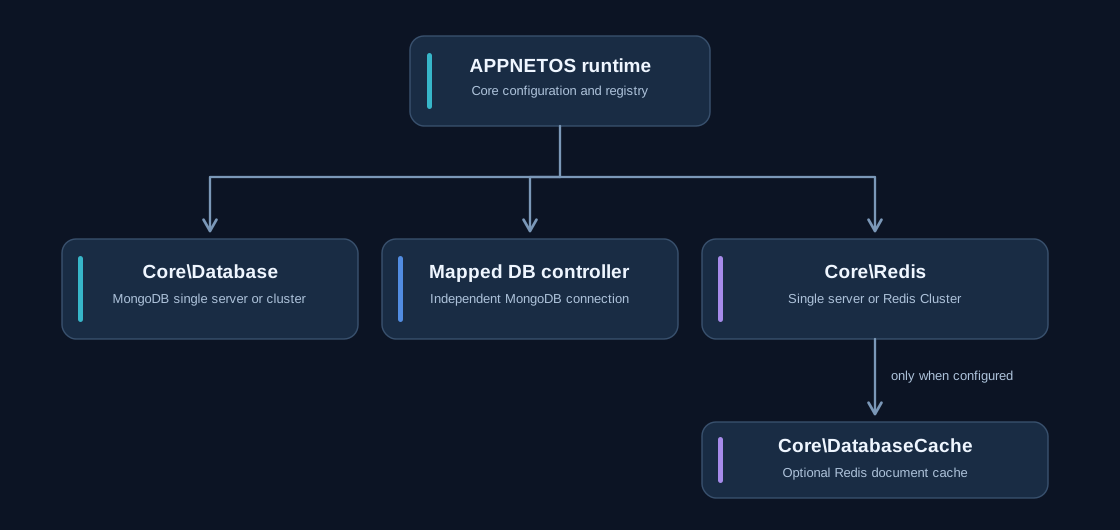
Core\Redis is the Redis counterpart to Core\Database. It supports standalone
servers and Redis clusters through connection parameters and client options. Different Redis controller
instances can be configured independently.
Connection parameters
public function connect(
    array|null $parameters = null,
    array|null $options = null,
    string|null $prefix = null,
): void
When arguments are omitted, the controller uses Redis settings from Core\Config. Parameters
may
describe a single Redis server or multiple cluster nodes; client options control the topology. The
prefix
isolates Redis keys.
Standalone and cluster configuration
The redis configuration supports either one Redis endpoint or multiple Redis Cluster nodes.
Both variants use the same prefix, parameters, and options keys.
The following snippets show the redis entry within the APPNETOS configuration array.
Standalone Redis
'redis' => [
    'prefix' => 'appnetos',
    'parameters' => [
        'scheme' => 'tcp',
        'host' => 'appnetos-3-redis',
        'port' => 6379,
        'password' => 'YOUR_REDIS_PASSWORD',
        'database' => 0,
    ],
    'options' => [],
],
For a standalone server, parameters is an associative array describing one endpoint.
The database setting selects the logical Redis database for that connection.
Redis Cluster
'redis' => [
    'prefix' => 'appnetos',
    'parameters' => [
        [
            'scheme' => 'tcp',
            'host' => 'redis-node-1',
            'port' => 6379,
        ],
        [
            'scheme' => 'tcp',
            'host' => 'redis-node-2',
            'port' => 6379,
        ],
    ],
    'options' => [
        'cluster' => 'redis',
        'parameters' => [
            'password' => 'YOUR_REDIS_PASSWORD',
        ],
    ],
],
For Redis Cluster, parameters becomes a list of node endpoints. The
options.cluster value selects Redis Cluster mode, while
options.parameters.password supplies the shared authentication value in this example.
The configured nodes act as initial connection endpoints; they are not separate application-level Redis
instances.
Replace the example hostnames and password placeholder with values appropriate to the deployment. Do not commit production credentials to version control. The examples describe the two configurations supplied in the Redis pre-documentation; verify cluster connectivity and authentication against the deployed Redis topology.
Optional dependency
The APPNETOS Core uses Redis primarily for automatic database-document caching. When Redis is not configured or available, database caching is disabled; ordinary MongoDB operations remain usable. Redis is not required for applications that do not depend on it. Applications that store their own data in Redis must enable Redis and define their own availability requirements and failure handling.
$redis = Registry::get(\Core\Redis::class);
if ($redis->isConnected()) {
    $redis->setex('example:status', 3600, 'ready');
}
Public API Reference
Core\Redis
Class & Registry
Class:
Core\Redis
Extends:
Core\Redis\Base
use Core\Redis;
use Core\Registry;

$redis = Registry::get(Redis::class);| Method | Description |
|---|---|
init() |
Initialize Redis controller. |
connect / disconnect() |
Open or release the current Redis connection. |
getClient / getConnected / isConnected / getPrefix() |
Inspect client, status and key prefix. |
set / setex / get / mget / append / getset() |
String operations. |
hset / hget / hgetall / hdel / hincrby() |
Hash operations. |
sadd / smembers / srem / sismember() |
Set operations. |
lpush / rpush / lrange() |
List operations. |
del / unlink / expire / exists / ttl / scan() |
Key management and expiry. |
incr / decr() |
Counters. |
executeCommand / pipeline() |
Advanced commands and batched execution. |