
TopSidebar
A page shell for applications that need persistent navigation beside the main content.
CoreUi\Frameset\TopSidebar provides the Top + Sidebar + Content layout.
Unlike Core Apps, Core UI elements provide reusable controllers and templates without their own
translations.
Layout regions
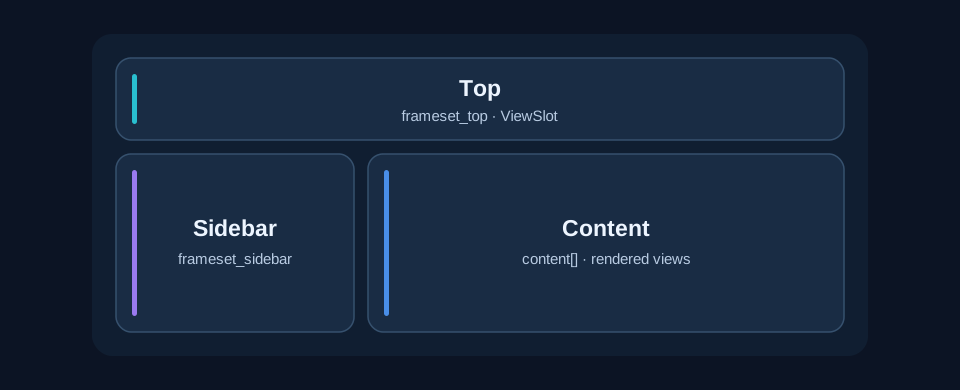
frameset_top,
frameset_sidebar and content[].
Named regions are populated from shared render variables via ViewSlots. The main
content[]
region is a collection of rendered views passed by the Core Render controller, not
a
ViewSlot. Twig outputs these views with |raw. Optional regions are omitted when empty.
Integration with Core Render
Framesets implement Core\Render\Interface\ContentRendererInterface. An application
context
can select a frameset by overriding getContentRenderer() in its mapped Render
controller.
When no explicit template stack is registered, Core\Render::send() calls
init(), passes the collected content through setContent(), and returns
getView()
(optionally compressed).
#[Shared]
class Render extends CoreRender
{
    protected function getContentRenderer(): object|null
    {
        return Registry::get(TopSidebar::class);
    }
}
Replace TopSidebar with the selected class and import Core\Registry, Core\Render
as CoreRender and Core\Annotation\Shared. APPNETOS Docs uses this approach
with
TopContentBottom.
ViewSlot lifecycle
Components render their own HTML and contribute it to named regions through Core\Render\ViewSlotRegistry.
Calling prepend() or append() creates a missing slot automatically. Each
new
ViewSlot registers itself with the shared registry and synchronizes its rendered string
into Core\Render\Variables under the slot key. Subsequent updates synchronize the same
variable.
$slots = Registry::get(ViewSlotRegistry::class);
$slots->append('frameset_top', $renderedNavigation);
Import Core\Render\ViewSlotRegistry and Core\Registry. Each key identifies
one
registered slot; direct duplicate registration through add() is rejected. Slot contents
are
already rendered HTML and are emitted with Twig's |raw filter. Only add trusted,
correctly
escaped output.
Rendering lifecycle and customization
The frameset's init() resolves required controllers. setContent(array
$content)
replaces the content view list, addContent(string $view) appends one rendered view, and
getView() renders the Twig layout through Core\Render::load(). The result
is
cached per frameset instance after its first getView() call; populate all slots and
content
before rendering.
The frameset template extends appnetos/shared/templates/base.html.twig and overrides its
body block. Adapt layout through the documented protected template hooks in a custom
implementation, or through APPNETOS template overrides.
Template and implementation details
Default template:
appnetos/shared/ui/frameset/top-sidebar/templates/top-sidebar.html.twig.
The protected getTemplate() method selects this template.
During init(), the controller resolves Core\Css and registers /src/appnetos/shared/ui/frameset/top-sidebar/css/CoreUiFramesetTopSidebar.min.css
using addCss(). The protected getCss() hook exposes this path for
customization. The top and sidebar are rendered only when their respective variables are non-empty.