
Autoload Bootstrap
The eighth bootstrap step registers the PHP class-loading paths for the resolved APPNETOS base context and the active application runtime context, preserving their intended boundaries.
Purpose and Execution
Bootstrap\Autoload\AutoloadBootstrap runs after Security
Bootstrap and before Class
Extension Bootstrap. Application Bootstrap has already determined the application, runtime
context and base context.
The bootstrap explicitly requires the fundamental Core base classes, loads Core and optional application autoload definitions, requires active Composer autoload files, recursively collects source directories, then registers one APPNETOS SPL autoloader with prepend enabled.
// Simplified AutoloadBootstrap::boot() sequence
$this->requireBaseClasses();
$autoloads = $this->loadAutoloads();
$this->requireComposerAutoloads($autoloads);
$this->directories = $this->collectAutoloadDirectories($autoloads);
spl_autoload_register([$this, 'autoload'], true, true);
Base Context and Runtime Context Isolation
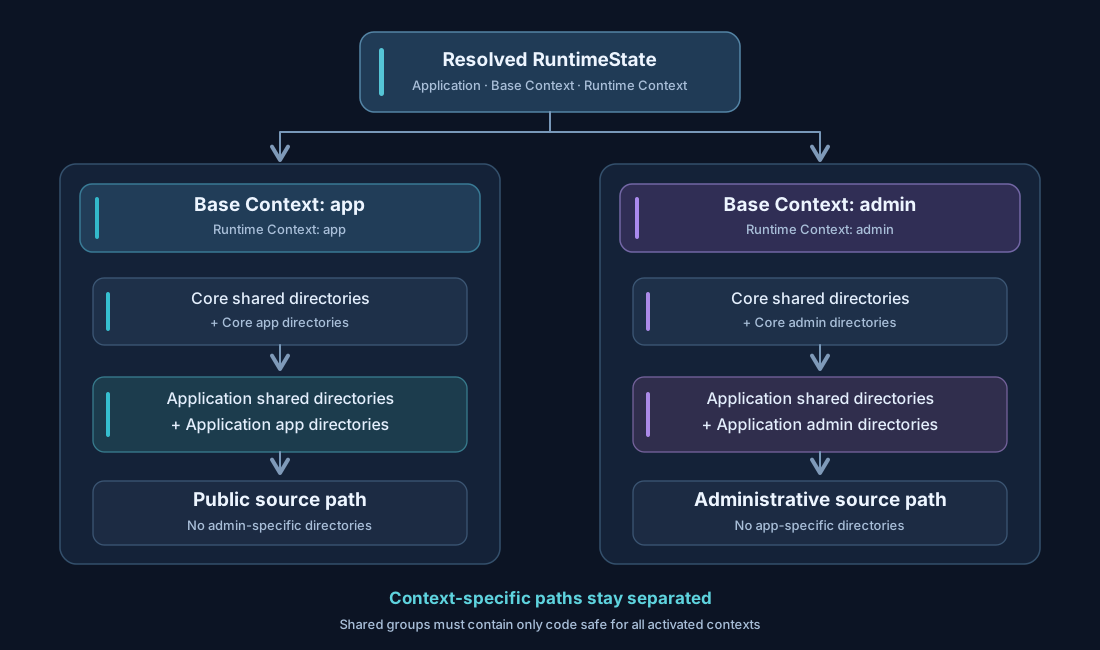
The diagram contrasts a public app request with an administrative admin
request. Each path includes Core shared sources, its own Core base-context sources, application shared
sources and the exact application runtime-context sources. Context-specific source trees must not cross
the boundary.
Configuration Files and Environment Replacement
The Core definition is mandatory; the active application definition is optional. Both are evaluated before class-extension and core initialization.
appnetos/shared/autoload.php                   # Required Core configuration
platform/autoload/example-application.php      # Optional installed application configuration
platform/autoload/example-application.docker.php # Environment-specific replacement
When APPNETOS_ENVIRONMENT is docker and the matching file exists, the
environment-specific file replaces the default application autoload definition. The
arrays are not merged. If neither application file exists, APPNETOS proceeds with the Core definition
and an empty application context definition. A missing Core autoload file is an error.
Complete Application Configuration
This illustrative configuration intentionally includes both public and administrative contexts so the isolation rules are visible. It is not the DNS Control configuration, whose runtime contexts are administrative.
<?php

declare(strict_types=1);

return [
    'application' => 'example-application',
    'contexts' => [
        'shared' => [
            'composer' => [
                'example-application/vendor/autoload.php',
            ],
            'directories' => [
                'example-application/shared/src',
            ],
        ],
        'app' => [
            'directories' => [
                'example-application/app/src',
            ],
        ],
        'admin' => [
            'directories' => [
                'example-application/admin/src',
            ],
        ],
    ],
];
The application value must match the installed application identifier. contexts
is the container for the optional shared group and exact runtime-context groups. Each group
may define composer, directories, or both.
Core vs. Application Context Selection
Core autoload configuration: load shared, then the resolved base
context, then the exact runtime context if it differs from the base context.
Application autoload configuration: load shared, then the exact
runtime context. Application definitions do not implicitly inherit the
base-context group. Base-context inheritance is reserved for the Core definition.
// Example: runtime context "admin-rest" mapped to base context "admin"
// Core:        shared -> admin -> admin-rest (if defined)
// Application: shared -> admin-rest (if defined)
// Application "admin" is NOT automatically loaded for "admin-rest".Do not register administrative source directories in public app
paths, or public context-specific directories in admin. Only place code in
shared when it is safe for every runtime context that may activate the application. An
incorrect shared definition bypasses the intended autoload directory separation.
Context isolation limits which APPNETOS source directories are registered; it is not an authorization boundary on its own. Composer dependencies, explicitly required files and other executable code still require normal security review.
Composer Autoload Files
composer is an optional array of file paths relative to APPNETOS_ROOT. Existing
files from active groups are loaded with require_once before the APPNETOS SPL autoloader is
registered. Duplicate files are required only once; missing files are skipped.
 'shared' => [
     'composer' => [
         'example-application/vendor/autoload.php',
     ],
 ],
Composer is responsible for classes outside the registered APPNETOS source directories. Composer dependencies should not be treated as a mechanism for crossing runtime security boundaries.
Source Directories
directories is an optional array of directory paths relative to APPNETOS_ROOT.
Existing directories and their subdirectories are registered recursively. Missing directories are
ignored and duplicate directory paths are included only once.
 'admin' => [
     'directories' => [
         'example-application/admin/src',
     ],
 ],
APPNETOS searches registered directories for a filename matching the requested class short name, such as
ExampleService.php, and checks that the file declares the requested fully qualified class,
interface, trait or enum before loading it. A file with the same basename but a different declaration is
skipped. The autoloader is prepended to the SPL chain.
Configuration Reference
| Key | Type | Meaning |
|---|---|---|
application |
string |
Must match the expected application identifier; appnetos identifies the Core
definition.
|
contexts |
array |
Contains autoload groups keyed by context. |
contexts.shared |
array |
Loaded for every runtime context. |
contexts.<context> |
array |
Loaded for the exact active runtime context; Core additionally uses the base context. |
composer |
array |
Optional relative Composer autoload file paths. |
directories |
array |
Optional relative source directories; recursive registration. |
Invalid configuration structures, including malformed active group definitions, raise bootstrap exceptions. Nonexistent Composer files and source directories are ignored. Validate paths carefully; the bootstrap does not automatically determine whether a configured directory belongs to the correct security context.
Customization and Update Safety
In particular, never edit <application>/.files/
or add permanent customizations to an application’s original directory. Application updates can
overwrite or remove those changes. Maintain custom installation sources in ./custom/,
or
edit the effective installed autoload configuration in ./platform/autoload/ when
appropriate.
Autoload Bootstrap reads the installed application configuration from platform/autoload/.
The APPNETOS class resolver also supports custom PHP source precedence, but the custom installation and
class customization mechanisms are documented separately in Application Customization and Custom
Installation.