
Development & Production
Use APPNETOS environment-specific configuration overlays to keep development convenient and production predictable, secure, and efficient.
Development and production are not separate configuration systems. Both use the same Core\Config\Base
loader, typed properties, and validation rules. The active runtime environment determines which
additional configuration files are loaded.
Environment Resolution and Precedence
The configuration controller obtains the environment name from
runtime()->getEnvironment(). APPNETOS then searches platform/config/ for
the corresponding environment-specific files and merges all existing files in the following order:
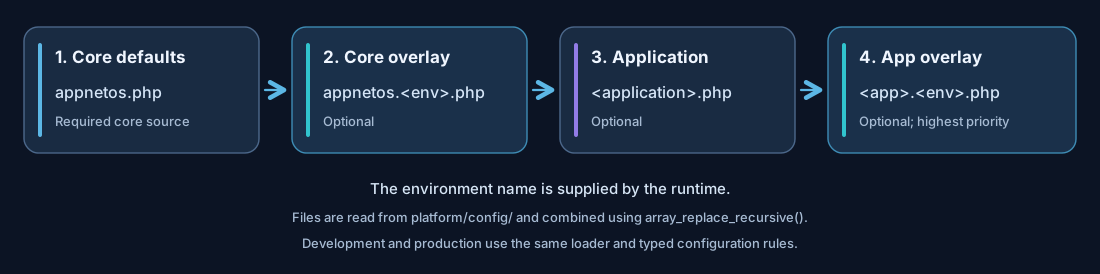
platform/config/appnetos.phpplatform/config/appnetos.<environment>.phpplatform/config/<application>.phpplatform/config/<application>.<environment>.php
At least one global APPNETOS configuration file must exist. Application-specific configuration files are optional. If no environment-specific file exists, APPNETOS continues with the available configuration rather than requiring a separate file for every environment.
The examples below use development
and production for readability. The actual filename suffix must match the environment
name
returned by the runtime; do not assume that the loader translates or aliases environment names.
Environment-specific Overlays
Keep common settings in the base configuration and override only values that differ between environments.
The files return PHP arrays with the same contexts structure.
Base configuration
<?php

return [
    'contexts' => [
        'app' => [
            'database_cache' => false,
            'app_cache' => false,
            'twig_cache' => false,
            'session_timeout' => 2592000,
        ],
        'admin' => [
            'database_cache' => false,
            'twig_cache' => false,
            'session_timeout' => 3600,
        ],
    ],
];
Example production overlay
<?php

return [
    'contexts' => [
        'app' => [
            'database_cache' => true,
            'app_cache' => true,
            'twig_cache' => true,
            'js_cache' => true,
            'css_cache' => true,
            'js_minify' => true,
            'css_minify' => true,
        ],
        'admin' => [
            'database_cache' => true,
            'twig_cache' => true,
            'js_cache' => true,
            'css_cache' => true,
        ],
    ],
];
These are illustrative settings, not universal deployment defaults.
Enable app_cache only for Apps that support caching and whose rendered output can safely be
reused.
APPNETOS combines arrays with array_replace_recursive(). This means nested keys can be
overridden individually, but numeric-indexed arrays are merged by index rather than automatically
replaced as whole lists. Review connection endpoint lists and similar arrays carefully when changing
them per environment.
Development Recommendations
During development, prioritize visible changes, repeatable tests, and transparent error reporting. The
exact runtime debug state is supplied by the runtime and exposed by getDebug(); it is not a
contexts.app.debug or contexts.admin.debug property in the current
configuration classes.
| Area | Development approach | Reason |
|---|---|---|
| Class and directory caches | Disable while modifying class locations and mappings | Keep changes visible without stale path metadata |
| Twig cache | Disable while editing templates | Reduce stale compiled template behavior |
| JavaScript and CSS caches | Disable during active asset development | Inspect current assets without generated-file reuse |
| Rendered App and content caches | Disable when editing render logic or content | Avoid stale static HTML during testing |
| REST registry cache | Disable when changing REST annotations or exposed resources | Allow metadata to be rediscovered |
| Database and Redis | Use isolated development instances or databases | Avoid affecting production data and cache keys |
| Mailer | Use a test SMTP relay or local mail capture service | Avoid sending test messages to real recipients |
Production Recommendations
In production, enable only caches whose invalidation behavior is understood, protect administrative operations, and keep infrastructure connections appropriately secured.
Caching and content updates
database_cache_expire and app_cache_expire are TTL values in seconds. By
contrast, content_cache and content_element_cache store rendered static HTML
without TTL. The application must explicitly invalidate these caches when the
underlying content changes.
Asset caching generates uniquely named JavaScript and CSS files. After cache clearing and regeneration,
new hashed filenames cause browsers to request the updated assets. rest_cache caches REST
resource registry metadata, not generic HTTP API responses.
Sessions and access controls
Review session_timeout and session_persistent independently for app and admin.
When persistence is disabled, the session cookie is a browser-session cookie; when enabled, it receives
a lifetime based on the configured timeout. The server-side session lifetime remains a separate concern.
The default clear_all_caches_parameter is appnetos-clear-cache. Change this
value in production and restrict access to the cache-clearing operation. Renaming a query parameter is
not, by itself, an authorization mechanism.
Infrastructure and credentials
MongoDB connection configuration is mandatory, including for command and worker processes. Use appropriate credentials and connection settings for production MongoDB and Redis. Redis prefixes help distinguish key namespaces but are not a substitute for instance or access isolation.
Store credentials outside publicly served paths and restrict filesystem access to deployed configuration files. Treat application and environment configuration as sensitive operational material.
SMTP certificate verification
Prefer a trusted SMTP certificate whose hostname matches the configured host. For an internal SMTP server
running on another VM, connecting through its private IP may produce a hostname mismatch. Setting ignore_certificate
to true can accommodate that deployment, but it disables certificate and hostname
verification and therefore weakens transport authentication. Prefer internal DNS and trusted
certificates whenever feasible.
Statistics and storage
Enable statistics deliberately. Collected statistics can grow significantly in MongoDB; plan
retention and storage capacity according to application requirements.
Deploying Configuration Changes
APPNETOS loads its active runtime configuration from platform/config/. Changes to files in
custom/<application>/.files/platform/ are installation-source changes and do not
automatically change the runtime configuration.
- Prepare the correct environment-specific files and review their merged values.
- Back up the existing target configuration before reinstallation or replacement.
- Deploy the updated files to
platform/config/using the intended installation or deployment workflow. - Remember that normal installation skips existing files; reinstallation overwrites target files present in the selected source but does not remove unrelated files.
- Clear or regenerate affected caches when configuration or resource changes require it.
- Verify the application, admin, REST, command, and worker contexts relevant to the deployment.
Avoid assuming that changing a configuration file automatically refreshes long-running worker processes. Restart affected processes when their configuration is initialized once at startup.
Environment Checklist
| Check | Development | Production |
|---|---|---|
| Correct runtime environment and overlay files | Verify | Verify |
| MongoDB and Redis connectivity | Isolated test services | Secured production services |
| Template, asset, and class caching | Usually disabled during active edits | Enable selectively |
| Static content cache invalidation | Test behavior | Required when enabled |
| Mailer recipients and transport | Test relay or mail capture | Verified SMTP or selected transport |
| Cache-clearing request parameter | Controlled local access | Change default and restrict access |
| Worker process configuration | Restart after changes as needed | Managed restart on deployment |